kubernetes 装好正常运行一段时间后,会出现要把研发和运维权限分开的场景:
比如:
- 给某个用户某一指定名称空间下的管理权限
- 给用户赋予集群的只读权限
- …
非常麻烦,我们这里不讨论过多的概念,从运维的角度出发,简单实用化
我们需要明确三个RBAC最基本的概念
- Role: 角色,它定义了一组规则,定义了一组对Kubernetes API对象的操作权限
- RoleBinding: 定义了"被作用者"和"角色"的绑定关系
- Subject: 被作用者,既可以是"人",也可以是机器,当然也可以是 Kubernetes 中定义的用户(ServiceAccount主要负责kubernetes内置用户)
我们的操作过程流程如下,首先创建客户端证书;其次创建Role角色;再创建RoleBinding,把Subject和Role绑定,就完事了;最后一步是生成 kubectl 的配置文件。
一、创建客户端证书
我们以已建好的阿里 ACK 为例,或者自建好的 Kubernetes 也行;确定已经有了 .kube/config 配置文件,拥有集群最高权限,并且可以正常执行 kubectl 命令。
首先是生成证书,并向集群提出证书请求并签发,脚本如下:
#!/bin/sh

useraccount=reader

openssl req -new -newkey rsa:4096 -nodes -keyout $useraccount-k8s.key -out $useraccount-k8s.csr -subj "/CN=$useraccount/O=devops"
csr=$(cat $useraccount-k8s.csr | base64 | tr -d '\n')
cat << EOF > k8s-csr.yaml
apiVersion: certificates.k8s.io/v1beta1
kind: CertificateSigningRequest
metadata:
  name: $useraccount-k8s-access
spec:
  groups:
  - system:authenticated
  request: $csr
  usages:
  - client auth
EOF


kubectl create -f k8s-csr.yaml
kubectl certificate approve $useraccount-k8s-access

kubectl get csr $useraccount-k8s-access -o jsonpath='{.status.certificate}' | base64 --decode > $useraccount-k8s-access.crt
kubectl config view -o jsonpath='{.clusters[0].cluster.certificate-authority-data}' --raw | base64 --decode - > k8s-ca.crt
解释一下:我们定义了一个用户CN=reader,然后向集群发送了证书请求并签发,最终从集群获得了 reader-k8s-access.crt 的客户端证书和 k8s-ca.crt 的 CA 证书。
k8s-csr.yaml 和 reader-k8s.csr 都是中间产物,最终我们有了客户端私钥 reader-k8s.key ,客户端证书 reader-k8s-access.crt ,CA 证书 k8s-ca.crt 这三个有用的文件。
二、创建 Role 角色
cat << EOF >> role.yaml
apiVersion: rbac.authorization.k8s.io/v1
kind: Role
metadata:
  name: role-pods_reader
  namespace: default
rules:
- apiGroups:
  - ""
  resources:
  - pods
  - pods/log
  verbs:
  - get
  - list
  - watch
EOF

kubectl apply -f role.yaml
解释:我们创建了一个 role 角色,名字叫做 role-pods_reader,所属命名空间是 default ,它对 pods 和 pods/log 有 get 、list、watch的权限,也就是说role-pods_reader 可以查看 default 空间的 pods 和 pods 的日志。
三、创建 Rolebinding
cat << EOF >> rolebinding.yaml
apiVersion: rbac.authorization.k8s.io/v1
kind: RoleBinding
metadata:
  name: rolebinding-default_pods_reader
  namespace: default
roleRef:
  apiGroup: rbac.authorization.k8s.io
  kind: Role
  name: role-pods_reader
subjects:
- apiGroup: rbac.authorization.k8s.io
  kind: User
  name: reader
EOF

kubectl apply -f rolebinding.yaml
解释:我们创建了一个 rolebinding,名字叫做 rolebinding-default_pods_reader,同样所属命名空间是 default,它绑了两个东西,一个是 role,就是上面第二步创建的 role-pods_reader;另一个是 subject,对应了一个用户,就是我们第一步创建的那个 reader。
四、生成 kubectl 配置文件
#!/bin/sh
useraccount=reader
namespace=default

kubectl config set-cluster $(kubectl config view -o jsonpath='{.clusters[0].name}') --server=$(kubectl config view -o jsonpath='{.clusters[0].cluster.server}') --certificate-authority=k8s-ca.crt --embed-certs --kubeconfig=$useraccount-k8s-config

kubectl config set-credentials $useraccount --client-certificate=$useraccount-k8s-access.crt --client-key=$useraccount-k8s.key --embed-certs --kubeconfig=$useraccount-k8s-config

kubectl config set-context $useraccount --cluster=$(kubectl config view -o jsonpath='{.clusters[0].name}') --namespace=$namespace --user=$useraccount --kubeconfig=$useraccount-k8s-config

kubectl config use-context $useraccount --kubeconfig=$useraccount-k8s-config
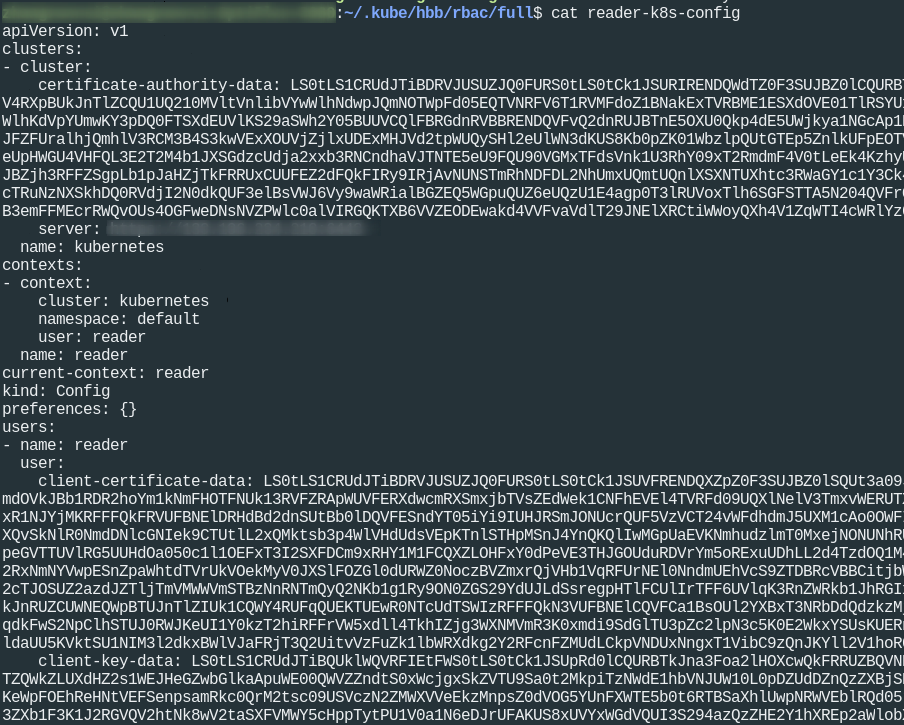
解释:上面看起来很复杂,其实就是四步,在配置文件里设置 cluster 、设置 credentials 证书、设置 context 上下文、设置当前上下文。
完事后会产生一个完整的 reader-k8s-config 文件,如下:
五、测试
我们验证一下:
KUBECONFIG=reader-k8s-config kubectl get pods

KUBECONFIG=reader-k8s-config kubectl auth can-i delete pods

KUBECONFIG=reader-k8s-config kubectl auth can-i delete svc
这样一个对 default 空间的只读用户就建立好了
六、集群只读用户
我们这里给出集群只读用户的 role,命名 role-cluster_reader
kubectl apply -f - <<EOF
apiVersion: rbac.authorization.k8s.io/v1
kind: ClusterRole
metadata:
  name: role-cluster_reader
rules:
- apiGroups:
  - ""
  resources:
  - nodes
  - pods
  - pods/exec
  - pods/log
  - services
  - configmaps
  - secrets
  - serviceaccounts
  - endpoints
  verbs:
  - get
  - list
  - watch
- apiGroups:
  - apps
  resources:
  - deployments
  - replicasets
  - daemonsets
  - statefulsets
  verbs:
  - get
  - list
  - watch
- apiGroups:
  - batch
  resources:
  - jobs
  - cronjobs
  verbs:
  - get
  - list
  - watch
EOF
以及 rolebinding,还是绑到第一步的用户 reader 的例子
kubectl apply -f - <<EOF
apiVersion: rbac.authorization.k8s.io/v1
kind: ClusterRoleBinding
metadata:
  name: rolebinding-cluster_reader
roleRef:
  apiGroup: rbac.authorization.k8s.io
  kind: ClusterRole
  name: role-cluster_reader
subjects:
- apiGroup: rbac.authorization.k8s.io
  kind: User
  name: reader
EOF
生成配置文件的步骤跟上一步是一样的。
从上面大家可以看到,其实最主要的就是 role 的 yaml 文件,里面控制着到底有怎么样的权限。