上一篇我们用losetup建了一个iscsi卷,现在空间不够了,需要释放掉之前建立的iscsi-volumes的20T空间。
首先去isci卷的宿主机查看一下
targetcli ls /
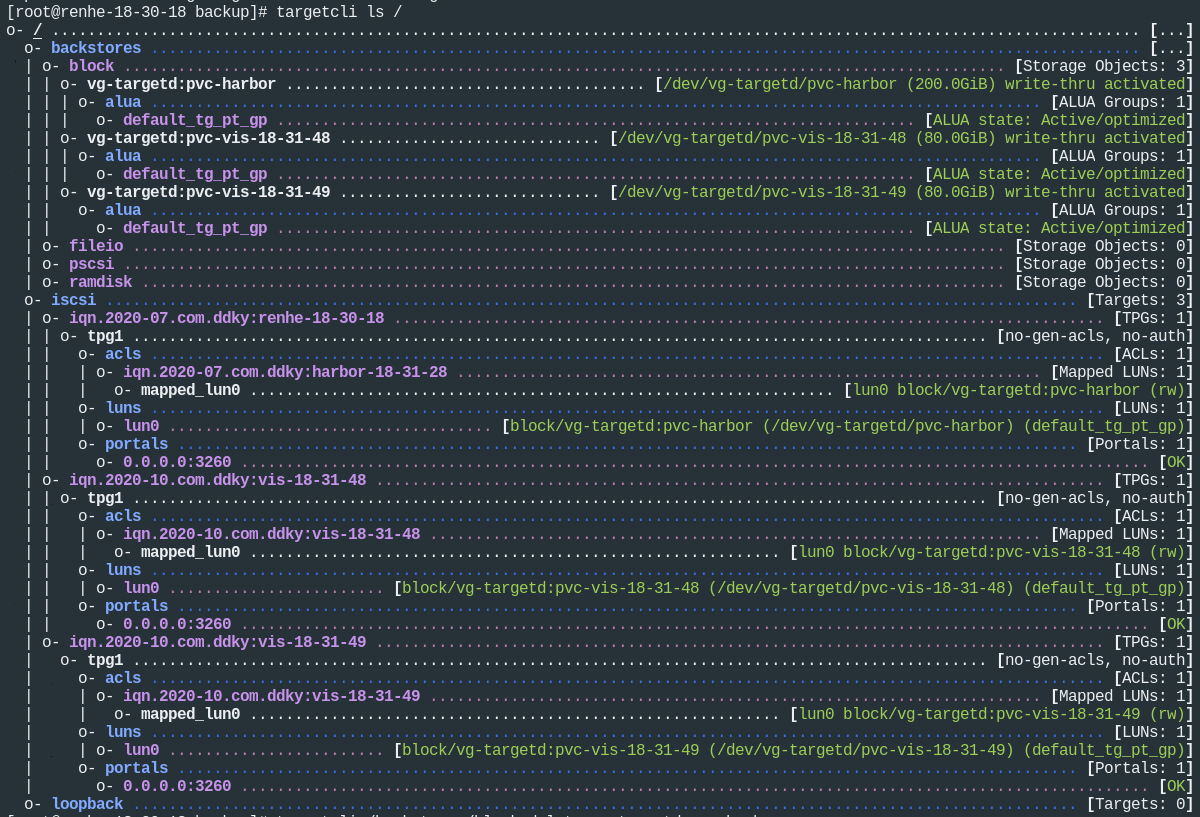
开始删除,先删除backstores,然后是iscsi,lv,vg,pv:
# targetcli /backstores/block delete vg-targetd:pvc-harbor
Deleted storage object vg-targetd:pvc-harbor.
# targetcli /backstores/block delete vg-targetd:pvc-vis-18-31-48
Deleted storage object vg-targetd:pvc-vis-18-31-48.
# targetcli /backstores/block delete vg-targetd:pvc-vis-18-31-49
Deleted storage object vg-targetd:pvc-vis-18-31-49.

# targetcli /iscsi delete iqn.2020-07.com.ddky:renhe-18-30-18
Deleted Target iqn.2020-07.com.ddky:renhe-18-30-18.
# targetcli /iscsi delete iqn.2020-10.com.ddky:vis-18-31-48
Deleted Target iqn.2020-10.com.ddky:vis-18-31-48.
# targetcli /iscsi delete iqn.2020-10.com.ddky:vis-18-31-49
Deleted Target iqn.2020-10.com.ddky:vis-18-31-49.

# lvs
  LV               VG         Attr       LSize   Pool Origin Data%  Meta%  Move Log Cpy%Sync Convert
  pvc-harbor       vg-targetd -wi-a----- 200.00g
  pvc-vis-18-31-48 vg-targetd -wi-a-----  80.00g
  pvc-vis-18-31-49 vg-targetd -wi-a-----  80.00g
# lvremove /dev/vg-targetd/pvc-harbor
Do you really want to remove active logical volume vg-targetd/pvc-harbor? [y/n]: y
  Logical volume "pvc-harbor" successfully removed
# lvremove /dev/vg-targetd/pvc-vis-18-31-48
Do you really want to remove active logical volume vg-targetd/pvc-vis-18-31-48? [y/n]: y
  Logical volume "pvc-vis-18-31-48" successfully removed
# lvremove /dev/vg-targetd/pvc-vis-18-31-49
Do you really want to remove active logical volume vg-targetd/pvc-vis-18-31-49? [y/n]: y
  Logical volume "pvc-vis-18-31-49" successfully removed

# vgremove vg-targetd
  Volume group "vg-targetd" successfully removed
# lvs
# vgs
# pvs
  PV         VG Fmt  Attr PSize  PFree
  /dev/loop0    lvm2 ---  19.53t 19.53t

# pvremove /dev/loop0
  Labels on physical volume "/dev/loop0" successfully wiped.
一整套下来,基本都干净了。
最后清理文件,注意如果不停掉targetd服务,是无法remove loop设备的
systemctl stop targetd
losetup -a
losetup -d /dev/loop0
losetup -a
cd /glusterfs/iscsi-volumes
rm -f k8s-iscsi-volumes.img
这样就多了20T磁盘空间。