要在生产环境建一套Elasticsearch 8.0,单节点搭配Kibana,确实是困难重重,新版本需要TLS验证了
现在这个时间节点,2025年9月2日,Elasticsearch最新版本是9.0,后撤2个版本是8.18.6
那就用这个版本了,然后根据官方的文档会把人搞糊涂的。
正确的方法如下:
一、建立自签的证书
其实可以用ACME的证书,但是没有人会三个月就去重启一下ES的容器,更新证书吧!
那只能选择自建CA,自签一个证书了!
因为有2个pod,es和kibana,所以要签两张证书,签证书随便用ES的一个版本就可以:
wget https://artifacts.elastic.co/downloads/elasticsearch/elasticsearch-8.4.1-linux-x86_64.tar.gz

tar -zxf elasticsearch-8.4.1-linux-x86_64.tar.gz

cd elasticsearch-8.4.1/
./bin/elasticsearch-certutil ca --pem

# 得到CA证书,放在当前目录ca目录下
unzip elastic-stack-ca.zip

# 生成签发配置文件
cat << EOF >instances.yml
instances:
   - name: es01
     dns:
       - es01
       - localhost
     ip:
       - 127.0.0.1
   - name: kibana
     dns:
       - kibana
       - localhost
     ip:
       - 127.0.0.1
EOF

# 签发2个pod的证书
./bin/elasticsearch-certutil cert --ca-cert ca/ca.crt --ca-key ca/ca.key --pem --in instances.yml

# 得到2张证书和key
unzip certificate-bundle.zip
# 生成两个目录,es01和kibana

# 准备好证书目录
mkdir -p /data/elasticsearch/certs
mv ca es01 kibana /data/elasticsearch/certs

# 准备好持久化卷
mkdir -p /data/elasticsearch/kibanadata
mkdir -p /data/elasticsearch/esdata01
二、配置docker-compose.yaml
8.18.6版本的docker-compose.yaml文件,位于:/data/elasticsearch/docker-compose.yaml
# docker-compose.yaml
services:
  es01:
    container_name: es
    # The Docker image to use for this service
    image: docker.elastic.co/elasticsearch/elasticsearch:8.18.6
    # The volumes to mount into this service
    volumes:
      - ./certs:/usr/share/elasticsearch/config/certs
      - ./esdata01:/usr/share/elasticsearch/data
    # The ports to expose from this service
    ports:
      - 9200:9200
    # The environment variables to set inside the container
    environment:
      - node.name=es01
      - cluster.name=lancode-cluster
      - discovery.type=single-node
      - ELASTIC_PASSWORD=aaaaaaaaaaaa
      - bootstrap.memory_lock=true
      - "ES_JAVA_OPTS=-Xms10g -Xmx10g"
      - xpack.security.enabled=true
      - xpack.security.http.ssl.enabled=true
      - xpack.security.http.ssl.key=certs/es01/es01.key
      - xpack.security.http.ssl.certificate=certs/es01/es01.crt
      - xpack.security.http.ssl.certificate_authorities=certs/ca/ca.crt
      - xpack.security.http.ssl.verification_mode=certificate
      - xpack.security.transport.ssl.enabled=true
      - xpack.security.transport.ssl.key=certs/es01/es01.key
      - xpack.security.transport.ssl.certificate=certs/es01/es01.crt
      - xpack.security.transport.ssl.certificate_authorities=certs/ca/ca.crt
      - xpack.security.transport.ssl.verification_mode=certificate
      - xpack.license.self_generated.type=basic
    # The memory limit for this service 12g = 1024*1024*1024*12
    mem_limit: 12884901888
    # The ulimits to set for this service
    ulimits:
      memlock:
        soft: -1
        hard: -1
    # The healthcheck to determine the health of this service
    healthcheck:
      test:
        [
          "CMD-SHELL",
          "curl -s --cacert config/certs/ca/ca.crt https://localhost:9200 | grep -q 'missing authentication credentials'",
        ]
      interval: 10s
      timeout: 10s
      retries: 120
  # The kibana service represents a Kibana instance
  kibana:
    # This service depends on the es01 service
    depends_on:
      es01:
        condition: service_healthy
    container_name: kibana
    # The Docker image to use for this service
    image: docker.elastic.co/kibana/kibana:8.18.6
    # The volumes to mount into this service
    volumes:
      - ./certs:/usr/share/kibana/config/certs
      - ./kibanadata:/usr/share/kibana/data
    # The ports to expose from this service
    ports:
      - 5601:5601
    # The environment variables to set inside the container
    environment:
      - SERVERNAME=kibana
      - ELASTICSEARCH_HOSTS=https://es01:9200
      - ELASTICSEARCH_USERNAME=kibana_system
      - ELASTICSEARCH_PASSWORD=bbbbbbbbbbbbbbb
      - ELASTICSEARCH_SSL_CERTIFICATEAUTHORITIES=config/certs/ca/ca.crt
      - xpack.security.audit.enabled=true
      - XPACK_ENCRYPTEDSAVEDOBJECTS_ENCRYPTIONKEY=cccccccccccccccccccccc
    # The memory limit for this service 2g = 1024*1024*1024*2
    mem_limit: 2147483648
    # The healthcheck to determine the health of this service
    healthcheck:
      test:
        [
          "CMD-SHELL",
          "curl -s -I http://localhost:5601 | grep -q 'HTTP/1.1 302 Found'",
        ]
      interval: 10s
      timeout: 10s
      retries: 120
注意上面的计算:
- 内存,系统是16G,2G保留,2G给kibana,12G给es,java启动参数给10g
- ELASTIC_PASSWORD=aaaaaaaaaaaa 这里的pass是指ES的独立用户elastic
- ELASTICSEARCH_PASSWORD=bbbbbbbbbbbbbb 这里的pass是指需要单独给kibana开的一个es用户kibana_system
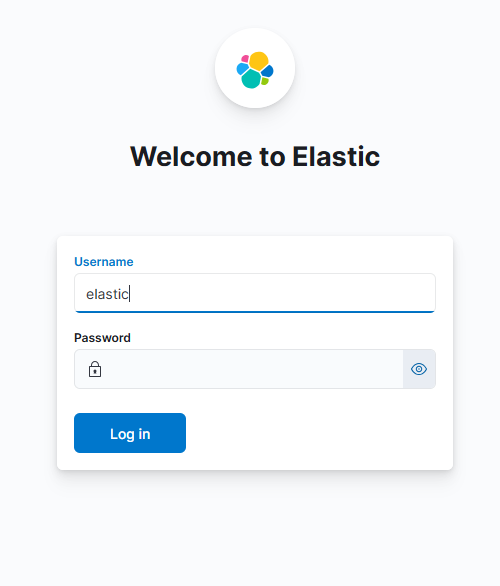
最后登录kibana的密码是elastic用户的密码aaaaaaaaa
这里差点被绕糊涂了,ES升级后需要启用https,然后也多加了用户。kibana需要单独用一个用户kibana_system去连接es,而es呢,也有一个独立的用户elastic进行管理。登录kibanna呢,实际是要用elastic这个用户登录。Faint!!!
三、启动
docker compose up -d

# 启动后必然报错,因为里面只有elastic这个用户,没有kibana_system用户
# 进入容器
docker exec -it es /bin/bash

# 生成密码
curl  -X POST --cacert config/certs/ca/ca.crt -u "elastic:aaaaaaaa" -H "Content-Type: application/json" https://es01:9200/_security/user/kibana_system/_password -d '{"password": "bbbbbbbb"}'

# 或者这样也行
docker-compose exec -T es bin/elasticsearch-reset-password --batch --user kibana_system
Password for the [kibana_system] user successfully reset.
New value: bbbbbbbb
然后就ok了,登录的时候用elastic的密码,不要用kibana_system!
四、题外
最鬼畜的地方就是kibana
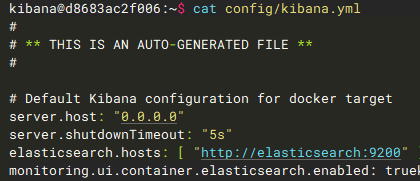
里面设置的两个配置项ELASTICSEARCH_USERNAME和ELASTICSEARCH_PASSWORD还有ELASTICSEARCH_HOSTS, 居然是环境变量
进入容器里看到的kibana.yaml,倒数第二行elasticsearch.hosts 根本就是错的,误导群众,这里是环境变量优先,根本没有用到kibana.yaml中的配置!!!一定要注意。
五、后记
无语啊无语,弄了自签证书,结果同事反映连接报证书错误
算了,给个不要证书的配置docker-compose.yaml
services:
  es01:
    container_name: es
    # The Docker image to use for this service
    image: docker.elastic.co/elasticsearch/elasticsearch:8.18.6
    # The volumes to mount into this service
    volumes:
      - ./certs:/usr/share/elasticsearch/config/certs
      - ./esdata01:/usr/share/elasticsearch/data
    # The ports to expose from this service
    ports:
      - 9200:9200
    # The environment variables to set inside the container
    environment:
      - node.name=es01
      - cluster.name=lancode-cluster
      - discovery.type=single-node
      - ELASTIC_PASSWORD=aaaaaaaaaaaa
      - bootstrap.memory_lock=true
      - "ES_JAVA_OPTS=-Xms10g -Xmx10g"
      - xpack.security.enabled=false
      - xpack.license.self_generated.type=basic
    # The memory limit for this service 12g = 1024*1024*1024*12
    mem_limit: 12884901888
    # The ulimits to set for this service
    ulimits:
      memlock:
        soft: -1
        hard: -1
    # The healthcheck to determine the health of this service
    healthcheck:
      test:
        [
          "CMD-SHELL",
          "curl -s -I http://localhost:9200 | grep -q 'HTTP/1.1 200 OK'",
        ]
      interval: 10s
      timeout: 10s
      retries: 120
  # The kibana service represents a Kibana instance
  kibana:
    # This service depends on the es01 service
    depends_on:
      es01:
        condition: service_healthy
    container_name: kibana
    # The Docker image to use for this service
    image: docker.elastic.co/kibana/kibana:8.18.6
    # The volumes to mount into this service
    volumes:
      - ./certs:/usr/share/kibana/config/certs
      - ./kibanadata:/usr/share/kibana/data
    # The ports to expose from this service
    ports:
      - 5601:5601
    # The environment variables to set inside the container
    environment:
      - SERVERNAME=kibana
      - ELASTICSEARCH_HOSTS=http://es01:9200
      - ELASTICSEARCH_USERNAME=kibana_system
      - ELASTICSEARCH_PASSWORD=bbbbbbbbbbbbbbb
      - xpack.security.enabled=false
      - xpack.security.audit.enabled=true
      - XPACK_ENCRYPTEDSAVEDOBJECTS_ENCRYPTIONKEY=cccccccccccccccccccccc
    # The memory limit for this service 2g = 1024*1024*1024*2
    mem_limit: 2147483648
    # The healthcheck to determine the health of this service
    healthcheck:
      test:
        [
          "CMD-SHELL",
          "curl -s -I http://localhost:5601 | grep -q 'HTTP/1.1 302 Found'",
        ]
      interval: 10s
      timeout: 10s
      retries: 120
区别在于 xpack.security.enabled=false和healthcheck