自打AWS全体迁移到AEPSLINK后,下一步就是Tencent腾讯的大迁移
这回已经有经验了,这里重点提一下腾讯MySQL的迁移,准备先建主备同步,切换的那天直接断开同步,就完事了
环境:腾讯的云数据库TencentDB是MySQL 8.0 InnoDB,内网IP 172.16.x.x
那建议是从一个跳板机进行端口转发进入MySQL,再从跳板机的security group对apeslink的IP进行限制
那第一步去腾讯云数据库备份中,把每天的full物理备份给下载出来
注:最佳方案是当时立刻手动备份一份,然后把备份拷贝到apeslink恢复
刚开始是去下载每天清晨自动的全备份,然后再拉binlog,实际操作过程中有问题,回放binlog的时候会出错,就很麻烦,浪费时间生命
Apeslink备库的操作如下,debian 12的操作系统,安装的社区版的8.0.45-1debian12的mysql:
腾讯备份采用的是xtrabackup,还用了qpress又压缩了一下,且binlog与my.cnf中的序列号不符
# 下载腾讯的full backup
wget -c "https://mysql-database-backup-xxx" -O /root/full.xb

# 下载percona,安装
wget https://repo.percona.com/apt/percona-release_latest.generic_all.deb
dpkg -i percona-release_latest.generic_all.deb

# 安装辅助包
apt install curl
apt --fix-broken install

percona-release setup pdps8.0

apt update
apt install -y percona-xtrabackup-80

apt install -y percona-release
percona-release enable tools release

apt update
apt install -y qpress
开始恢复:
mkdir /root/full
cd /root/full

# 恢复/root/full.xb文件到目录/root/full
xbstream -x < /root/full.xb

# 把qpress文件都解压缩
xtrabackup --decompress --remove-original --target-dir=/root/full

# 整理好 /root/full 目录
xtrabackup --prepare --target-dir=/root/full
然后去TencentDB把配置文件拉下来,放到/etc/mysql/mysql.conf.d/mysqld.cnf
内容如下:
# mysqld.cnf
[mysqld]
pid-file        = /var/run/mysqld/mysqld.pid
socket          = /var/run/mysqld/mysqld.sock
datadir         = /var/lib/mysql
log-error       = /var/log/mysql/error.log
server-id=111
log_bin=mysql-bin
enforce_gtid_consistency=ON
gtid_mode=ON
replica_preserve_commit_order=OFF

auto_increment_increment=1
auto_increment_offset=1
automatic_sp_privileges=ON
avoid_temporal_upgrade=OFF
back_log=3000
binlog_cache_size=32768
binlog_checksum=CRC32
binlog_order_commits=ON
binlog_row_event_max_size=8192
binlog_row_image=FULL
binlog_rows_query_log_events=OFF
binlog_stmt_cache_size=32768
binlog_transaction_compression=OFF
binlog_transaction_compression_level_zstd=3
block_encryption_mode=aes-128-ecb
bulk_insert_buffer_size=8388608
character_set_filesystem=binary
character_set_server=utf8mb4
collation_server=utf8mb4_general_ci
concurrent_insert=AUTO
connect_timeout=10
default_authentication_plugin=mysql_native_password
default_password_lifetime=0
default_storage_engine=InnoDB
default_week_format=0
delay_key_write=ON
delayed_insert_limit=100
delayed_insert_timeout=300
delayed_queue_size=1000
disconnect_on_expired_password=ON
div_precision_increment=4
end_markers_in_json=OFF
eq_range_index_dive_limit=200
event_scheduler=OFF
explicit_defaults_for_timestamp=OFF
flush_time=0
ft_max_word_len=84
ft_min_word_len=4
ft_query_expansion_limit=20
group_concat_max_len=1024
host_cache_size=643
information_schema_stats_expiry=86400
init_connect=
innodb_adaptive_flushing=ON
innodb_adaptive_flushing_lwm=10
innodb_adaptive_hash_index=ON
innodb_adaptive_max_sleep_delay=150000
innodb_autoextend_increment=64
innodb_autoinc_lock_mode=2
innodb_buffer_pool_dump_at_shutdown=ON
innodb_buffer_pool_dump_pct=25
innodb_buffer_pool_instances=8
innodb_buffer_pool_load_at_startup=ON
innodb_buffer_pool_size=12884901888
innodb_change_buffer_max_size=25
innodb_change_buffering=all
innodb_checksum_algorithm=crc32
innodb_cmp_per_index_enabled=OFF
innodb_commit_concurrency=0
innodb_compression_failure_threshold_pct=5
innodb_compression_level=6
innodb_compression_pad_pct_max=50
innodb_concurrency_tickets=5000
innodb_ddl_buffer_size=10485760
innodb_ddl_threads=4
innodb_deadlock_detect=ON
innodb_default_row_format=dynamic
innodb_disable_sort_file_cache=OFF
innodb_flush_log_at_trx_commit=2
innodb_flush_neighbors=0
innodb_flush_sync=ON
innodb_ft_cache_size=8000000
innodb_ft_enable_diag_print=OFF
innodb_ft_enable_stopword=ON
innodb_ft_max_token_size=84
innodb_ft_min_token_size=3
innodb_ft_num_word_optimize=2000
innodb_ft_result_cache_limit=2000000000
innodb_ft_server_stopword_table=
innodb_ft_sort_pll_degree=2
innodb_ft_total_cache_size=640000000
innodb_ft_user_stopword_table=
innodb_io_capacity=20000
innodb_io_capacity_max=40000
innodb_lock_wait_timeout=7200
innodb_log_checksums=ON
innodb_lru_scan_depth=1024
innodb_max_dirty_pages_pct=75.000000
innodb_max_dirty_pages_pct_lwm=0.000000
innodb_max_purge_lag=0
innodb_max_purge_lag_delay=0
innodb_max_undo_log_size=1073741824
innodb_monitor_disable=
innodb_monitor_enable=
innodb_old_blocks_pct=37
innodb_old_blocks_time=1000
innodb_online_alter_log_max_size=134217728
innodb_optimize_fulltext_only=OFF
innodb_page_cleaners=2
innodb_print_all_deadlocks=ON
innodb_purge_batch_size=300
innodb_purge_rseg_truncate_frequency=128
innodb_purge_threads=4
innodb_random_read_ahead=OFF
innodb_read_ahead_threshold=56
innodb_read_io_threads=4
innodb_rollback_on_timeout=OFF
innodb_rollback_segments=128
innodb_sort_buffer_size=1048576
innodb_spin_wait_delay=6
innodb_stats_auto_recalc=ON
innodb_stats_method=nulls_equal
innodb_stats_on_metadata=OFF
innodb_stats_persistent=ON
innodb_stats_persistent_sample_pages=20
innodb_stats_transient_sample_pages=8
innodb_status_output=OFF
innodb_status_output_locks=OFF
innodb_strict_mode=ON
innodb_sync_array_size=1
innodb_sync_spin_loops=30
innodb_table_locks=ON
innodb_temp_data_file_path=ibtmp1:12M:autoextend
innodb_thread_concurrency=0
innodb_undo_log_truncate=OFF
innodb_write_io_threads=4
interactive_timeout=3600
internal_tmp_mem_storage_engine=TempTable
join_buffer_size=262144
key_cache_age_threshold=300
key_cache_block_size=1024
key_cache_division_limit=100
lc_time_names=en_US
local_infile=ON
lock_wait_timeout=31536000
log_error_verbosity=3
log_output=FILE
log_queries_not_using_indexes=OFF
log_slow_admin_statements=OFF
log_throttle_queries_not_using_indexes=0
log_timestamps=SYSTEM
long_query_time=0.100000
low_priority_updates=OFF
lower_case_table_names=0
master_verify_checksum=OFF
max_allowed_packet=1073741824
max_connect_errors=999999999
max_connections=4500
max_error_count=64
max_execution_time=0
max_heap_table_size=16777216
max_length_for_sort_data=1024
max_points_in_geometry=65536
max_prepared_stmt_count=16382
max_sort_length=1024
max_sp_recursion_depth=0
max_user_connections=0
min_examined_row_limit=0
myisam_sort_buffer_size=8388608
mysql_native_password_proxy_users=OFF
mysqlx_max_connections=100
net_buffer_length=8192
net_read_timeout=30
net_retry_count=10
net_write_timeout=60
ngram_token_size=2
optimizer_prune_level=1
optimizer_search_depth=62
optimizer_trace_limit=1
optimizer_trace_max_mem_size=16384
optimizer_trace_offset=-1
performance_schema=OFF
preload_buffer_size=32768
query_alloc_block_size=8192
query_prealloc_size=8192
range_alloc_block_size=4096
range_optimizer_max_mem_size=8388608
read_buffer_size=262144
read_rnd_buffer_size=524288
session_track_gtids=OFF
session_track_schema=ON
session_track_state_change=OFF
sha256_password_proxy_users=OFF
show_old_temporals=OFF
slave_net_timeout=120
slave_parallel_type=DATABASE
slave_parallel_workers=16
slave_rows_search_algorithms=TABLE_SCAN,INDEX_SCAN
slow_launch_time=2
slow_query_log=ON
sort_buffer_size=1048576
sql_mode=ONLY_FULL_GROUP_BY,STRICT_TRANS_TABLES,NO_ZERO_IN_DATE,NO_ZERO_DATE,ERROR_FOR_DIVISION_BY_ZERO,NO_ENGINE_SUBSTITUTION
stored_program_cache=256
sync_binlog=0
table_definition_cache=8192
table_open_cache=8192
table_open_cache_instances=16
thread_cache_size=512
thread_handling=one-thread-per-connection
thread_stack=524288
tmp_table_size=209715200
transaction_alloc_block_size=8192
transaction_isolation=REPEATABLE-READ
transaction_prealloc_size=4096
updatable_views_with_limit=YES
wait_timeout=3600
注意上面这个文件,其实腾讯在里面加了很多自己的参数,经过一次又一次的启动失败,删掉了那些被标准版mysql无法识别参数,才弄成上面的样子。
停掉MySQL,然后替换数据目录
mv /var/lib/mysql /var/lib/mysql.bak.$(date +%F_%H%M%S)
mkdir -p /var/lib/mysql

xtrabackup --copy-back --target-dir=/root/full
chown -R mysql:mysql /var/lib/mysql

rm -f /var/lib/mysql/auto.cnf

systemctl start mysql
天知道 systemctl restart mysql了多少遍,才把mysqld.cnf给改对
下面就是追平 binlog 的过程
cat /var/lib/mysql/xtrabackup_info
...
binlog_pos = filename 'mysql-bin.003254', position '237'
...

# 然后去下载binglog,实际序列是3087 3088 3089 3090,跟上面的003254不相符
wget binlog 到bin.3087 bin.3088 bin.3089 bin.3090

# 回放
mysqlbinlog --disable-log-bin --start-position=237 ./bin.3087 ./bin.3088 ./bin.3089 ./bin.3090 | mysql -uroot -p
上面这步有时候很顺滑,有时候报错 所以建议是当场手动full backup一下,省略掉这一步
然后在腾讯主库上建同步用户
CREATE USER 'backup'@'%' IDENTIFIED BY 'xxxxxxxx';
GRANT REPLICATION SLAVE, REPLICATION CLIENT ON *.* TO 'backup'@'%';
FLUSH PRIVILEGES;
在apeslink上从库建同步
STOP REPLICA;

CHANGE REPLICATION SOURCE TO
  SOURCE_HOST='111.222.333.444',
  SOURCE_PORT=3306,
  SOURCE_USER='backup',
  SOURCE_PASSWORD='xxxxxxxx',
  SOURCE_AUTO_POSITION=1;

START REPLICA;

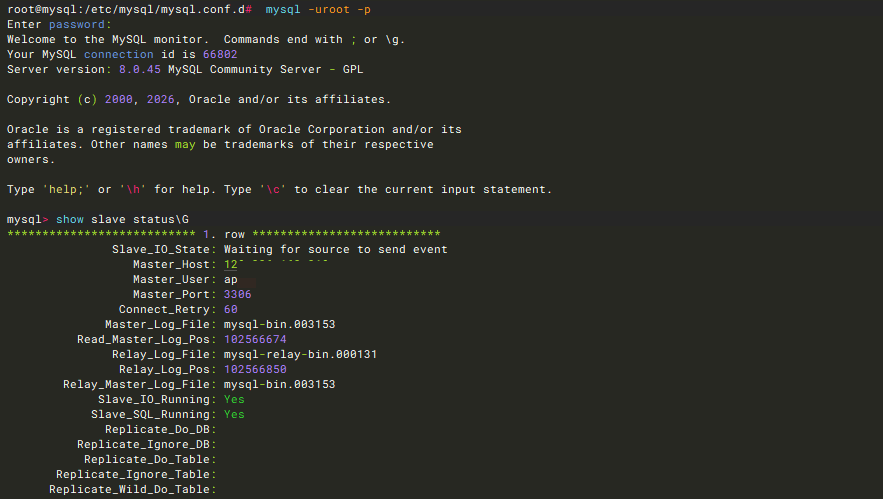
show slave status\G
看到Waiting for source to send event,这样就行了