我们之前学习了手撕大模型2 , 那学以致用,来运用一下
在本文中,我们将学习句子嵌入(Sentence Embeddings)的工作原理,以及如何使用 Transformers.js 构建一个完全在客户端(浏览器端)运行的语义搜索引擎。无需服务器、无需 API 密钥,也不需要任何后端基础设施。
我们将涵盖的主题包括:
- 句子嵌入和余弦相似度如何构成语义搜索的基础。
- 如何使用 Transformers.js 的特征提取管道(Feature-extraction Pipeline)来生成和缓存嵌入,包括批处理和 Web Worker 线程卸载。
- 如何构建一个通用的
SemanticSearch类,并实现索引在页面刷新后的持久化。
引言
你以前可能写过这样的“Bug”:用户在搜索框中输入“affordable laptop(便宜的笔记本)”,结果返回零匹配。但你分明知道数据库里有几十篇关于笔记本的文章,只不过它们的标题叫“budget notebook(经济型便携本)”。
单词完全不同,但意思一模一样。传统的re关键字搜索将它们视为无关的字符串,这就是关键字匹配的核心缺陷:它比较的是字符,而不是概念和语义。
语义搜索通过比较“含义”解决了这个问题。借助 Transformers.js,你可以在浏览器中独立实现它。
什么是句子嵌入?
Transformer 模型无法直接处理原始文本。在进行任何计算之前,句子必须变成数字。嵌入(Embeddings) 就是这种转换的结果:用一个被称为向量(Vector)的浮点数列表来表示一个句子。
它的关键特性在于:含义相似的句子在相同的向量空间里,其向量在几何结构上也是彼此接近的。
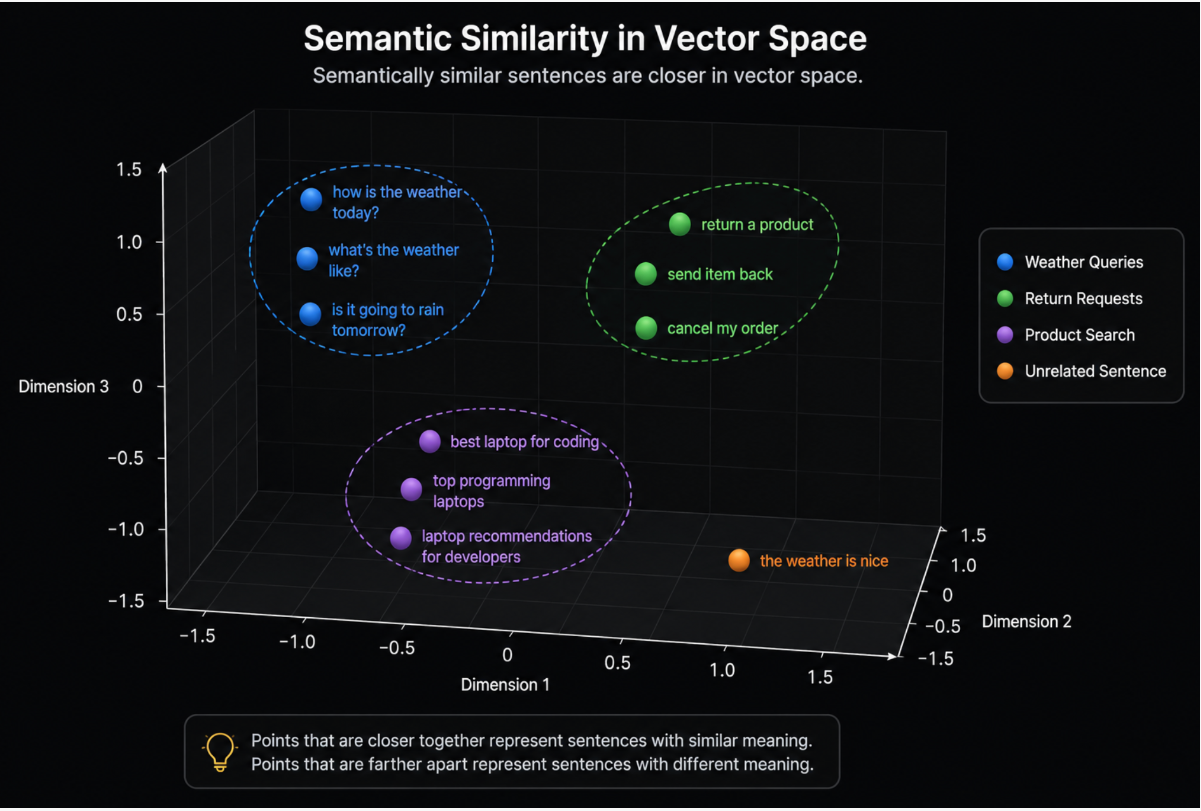
本教程中使用的模型 sentence-transformers/all-MiniLM-L6-v2会将每个句子映射到 384 维 的向量空间中。该模型在超过 10 亿个句子对上进行了微调。诸如“我需要取消订单”和“如何退货?”的向量会靠得很近,而“今天天气真好”则会离它们很远。
跟手撕大模型中的猫和狗各提问384个问题,然后逐渐训练后,猫和狗的位置会相互靠近。
给个3维的例子,相近语义的句子会自然靠在一起。但实际,我们不知道第74维到底是什么含义,那是训练后的自动结果:
平均池化与归一化(Pooling and Normalization)
原始的 Transformer 模型会为每个 Token 输出一个向量。对于语义搜索,我们需要每个句子只有一个向量。
- 平均池化(Mean Pooling):通过对所有 Token 向量取平均值来解决这个问题。
- 归一化(Normalization):将结果缩放到单位长度(模长为 1),这能极大简化相似度的计算。
在 Transformers.js 中,当你向管道调用传递 { pooling: 'mean', normalize: true } 时,这两个步骤都会自动完成。
我们来详细解释一下什么是平均池化:
下面把 Mean Pooling(平均池化) 用一个更细的例子拆开讲,重点解释:
Transformer 给每个 token 一个向量,Mean Pooling 如何把多个 token 向量变成一个句子向量。
1. 先从最简单例子开始
假设有一句话:
我 喜欢 机器 学习
为了方便理解,我们假设每个 token 的向量只有 3 维。
真实模型里通常是 384、768、1024、4096 维,但原理完全一样。
Transformer 输出如下:
我     -> [1, 2, 3]
喜欢   -> [2, 3, 4]
机器   -> [3, 4, 5]
学习   -> [4, 5, 6]
现在我们有 4 个 token 向量:
token1 = [1, 2, 3]
token2 = [2, 3, 4]
token3 = [3, 4, 5]
token4 = [4, 5, 6]
Mean Pooling 要做的是:
句子向量 = 所有 token 向量相加 / token 数量
2. 第一步:逐维相加
把 4 个向量按维度相加。
[1, 2, 3]
[2, 3, 4]
[3, 4, 5]
[4, 5, 6]
第 1 维相加:
1 + 2 + 3 + 4 = 10
第 2 维相加:
2 + 3 + 4 + 5 = 14
第 3 维相加:
3 + 4 + 5 + 6 = 18
所以所有 token 向量之和是:
[10, 14, 18]
3. 第二步:除以 token 数量
一共有 4 个 token,所以除以 4:
[10, 14, 18] / 4
逐维计算:
10 / 4 = 2.5
14 / 4 = 3.5
18 / 4 = 4.5
所以最终句子向量是:
[2.5, 3.5, 4.5]
这就是 Mean Pooling 的结果。
4. 用表格看更清楚
| Token | 第 1 维 | 第 2 维 | 第 3 维 |
|---|---|---|---|
| 我 | 1 | 2 | 3 |
| 喜欢 | 2 | 3 | 4 |
| 机器 | 3 | 4 | 5 |
| 学习 | 4 | 5 | 6 |
| 求和 | 10 | 14 | 18 |
| 平均 | 2.5 | 3.5 | 4.5 |
所以:
句子向量 = [2.5, 3.5, 4.5]
5. Mean Pooling 的本质
Mean Pooling 不是把词拼起来,也不是选一个词。
它是做这个事情:
每一维分别求平均
也就是说:
句子向量第 1 维 = 所有 token 第 1 维的平均值
句子向量第 2 维 = 所有 token 第 2 维的平均值
句子向量第 3 维 = 所有 token 第 3 维的平均值
...
如果真实模型输出 768 维,那么就是:
句子向量第 1 维 = 所有 token 第 1 维平均
句子向量第 2 维 = 所有 token 第 2 维平均
...
句子向量第 768 维 = 所有 token 第 768 维平均
6. 再加上特殊 token 的例子
真实 Transformer 输入通常不是:
我 喜欢 机器 学习
而可能是:
[CLS] 我 喜欢 机器 学习 [SEP]
模型会输出:
[CLS] -> [0, 1, 2]
我     -> [1, 2, 3]
喜欢   -> [2, 3, 4]
机器   -> [3, 4, 5]
学习   -> [4, 5, 6]
[SEP] -> [5, 6, 7]
这时候有两种常见做法:
做法 A:包含特殊 token 一起平均
把 [CLS] 和 [SEP] 也算进去:
[0, 1, 2]
[1, 2, 3]
[2, 3, 4]
[3, 4, 5]
[4, 5, 6]
[5, 6, 7]
求和:
第 1 维:0 + 1 + 2 + 3 + 4 + 5 = 15
第 2 维:1 + 2 + 3 + 4 + 5 + 6 = 21
第 3 维:2 + 3 + 4 + 5 + 6 + 7 = 27
一共 6 个 token,所以:
[15, 21, 27] / 6 = [2.5, 3.5, 4.5]
句子向量:
[2.5, 3.5, 4.5]
做法 B:只平均真实文本 token
只算:
我 喜欢 机器 学习
不算:
[CLS] [SEP]
那么就是前面的结果:
[2.5, 3.5, 4.5]
实际工程中,不同模型处理方式不完全一样。很多 sentence-transformers 风格的 embedding 模型会根据它自己的训练方式来决定是否包含特殊 token。
但核心思想不变:
有效 token 向量求平均
7. 更真实的问题:padding
Mean Pooling 里最重要的细节是:
不能把 padding token 算进去。
比如有两个句子:
句子 A:我 喜欢 机器 学习
句子 B:我 喜欢
为了让它们放进同一个 batch,短句子 B 要补齐:
句子 A:[CLS] 我 喜欢 机器 学习 [SEP]
句子 B:[CLS] 我 喜欢 [SEP] [PAD] [PAD]
这样两个句子长度都是 6。
8. 假设句子 B 的 token 向量
句子 B:
[CLS] 我 喜欢 [SEP] [PAD] [PAD]
对应向量假设是:
[CLS] -> [0, 1, 2]
我     -> [1, 2, 3]
喜欢   -> [2, 3, 4]
[SEP] -> [3, 4, 5]
[PAD] -> [9, 9, 9]
[PAD] -> [9, 9, 9]
注意:
[PAD] -> [9, 9, 9]
这里故意写成很大的值,是为了说明: 如果把 PAD 算进去,结果会被污染。
9. 错误做法:把 PAD 也平均进去
如果错误地把所有 6 个 token 都平均:
[0, 1, 2]
[1, 2, 3]
[2, 3, 4]
[3, 4, 5]
[9, 9, 9]
[9, 9, 9]
逐维求和:
第 1 维:0 + 1 + 2 + 3 + 9 + 9 = 24
第 2 维:1 + 2 + 3 + 4 + 9 + 9 = 28
第 3 维:2 + 3 + 4 + 5 + 9 + 9 = 32
除以 6:
[24, 28, 32] / 6 = [4, 4.67, 5.33]
错误的句子向量是:
[4, 4.67, 5.33]
这个结果明显被 [PAD] 的 [9, 9, 9] 拉偏了。
10. 正确做法:用 attention_mask 排除 PAD
句子 B:
[CLS] 我 喜欢 [SEP] [PAD] [PAD]
对应的 attention_mask 是:
[1, 1, 1, 1, 0, 0]
意思是:
[CLS] 有效 -> 1
我     有效 -> 1
喜欢   有效 -> 1
[SEP] 有效 -> 1
[PAD] 无效 -> 0
[PAD] 无效 -> 0
11. 用 mask 后怎么计算?
原始向量:
[CLS] -> [0, 1, 2]   mask = 1
我     -> [1, 2, 3]   mask = 1
喜欢   -> [2, 3, 4]   mask = 1
[SEP] -> [3, 4, 5]   mask = 1
[PAD] -> [9, 9, 9]   mask = 0
[PAD] -> [9, 9, 9]   mask = 0
每个 token 向量乘以 mask:
[CLS] -> [0, 1, 2] × 1 = [0, 1, 2]
我     -> [1, 2, 3] × 1 = [1, 2, 3]
喜欢   -> [2, 3, 4] × 1 = [2, 3, 4]
[SEP] -> [3, 4, 5] × 1 = [3, 4, 5]
[PAD] -> [9, 9, 9] × 0 = [0, 0, 0]
[PAD] -> [9, 9, 9] × 0 = [0, 0, 0]
所以有效参与求和的是:
[0, 1, 2]
[1, 2, 3]
[2, 3, 4]
[3, 4, 5]
[0, 0, 0]
[0, 0, 0]
12. 求和
逐维相加:
第 1 维:0 + 1 + 2 + 3 + 0 + 0 = 6
第 2 维:1 + 2 + 3 + 4 + 0 + 0 = 10
第 3 维:2 + 3 + 4 + 5 + 0 + 0 = 14
所以和是:
[6, 10, 14]
13. 除以有效 token 数量
注意,不是除以 6。
因为有效 token 只有 4 个:
attention_mask 之和 = 1 + 1 + 1 + 1 + 0 + 0 = 4
所以:
[6, 10, 14] / 4 = [1.5, 2.5, 3.5]
最终句子 B 的 Mean Pooling 结果是:
[1.5, 2.5, 3.5]
14. 用表格看 mask 计算过程
| Token | 向量 | Mask | 乘 Mask 后 |
|---|---|---|---|
[CLS] | [0, 1, 2] | 1 | [0, 1, 2] |
| 我 | [1, 2, 3] | 1 | [1, 2, 3] |
| 喜欢 | [2, 3, 4] | 1 | [2, 3, 4] |
[SEP] | [3, 4, 5] | 1 | [3, 4, 5] |
[PAD] | [9, 9, 9] | 0 | [0, 0, 0] |
[PAD] | [9, 9, 9] | 0 | [0, 0, 0] |
求和:
[6, 10, 14]
有效 token 数量:
4
平均:
[6, 10, 14] / 4 = [1.5, 2.5, 3.5]
15. Mean Pooling 的通用公式
假设:
H1, H2, H3, ..., Hn
是每个 token 的向量。
M1, M2, M3, ..., Mn
是 attention mask。
那么:
句子向量 = (H1×M1 + H2×M2 + ... + Hn×Mn) / (M1 + M2 + ... + Mn)
也就是:
sentence_embedding = sum(token_embedding × attention_mask) / sum(attention_mask)
16. 对应到代码
假设模型输出:
token_embeddings
形状是:
[batch_size, seq_len, hidden_size]
例如:
[2, 6, 3]
表示:
2 个句子
每个句子 6 个 token
每个 token 3 维向量
attention_mask 是:
attention_mask
形状是:
[batch_size, seq_len]
例如:
[2, 6]
代码:
def mean_pooling(token_embeddings, attention_mask):
    mask = attention_mask.unsqueeze(-1).float()
    masked_embeddings = token_embeddings * mask
    sum_embeddings = masked_embeddings.sum(dim=1)
    token_count = mask.sum(dim=1)
    sentence_embeddings = sum_embeddings / token_count
    return sentence_embeddings
17. 每一行代码对应什么?
原始形状
token_embeddings.shape
可能是:
[2, 6, 3]
表示:
2 个句子,每句 6 个 token,每个 token 3 维
attention_mask.shape
是:
[2, 6]
比如:
[
  [1, 1, 1, 1, 1, 1],
  [1, 1, 1, 1, 0, 0]
]
这一行:
mask = attention_mask.unsqueeze(-1).float()
把:
[2, 6]
变成:
[2, 6, 1]
为什么要这样?
因为 token 向量是 3 维:
[2, 6, 3]
mask 需要能和每个 token 的每一维相乘。
原来 mask 是:
1
要变成可以作用到整个向量:
[1, 1, 1]
也就是:
textmask=1 -> 保留整个 token 向量
mask=0 -> 整个 token 向量变成 0
这一行:
masked_embeddings = token_embeddings * mask
就是把 PAD 清零。
例如:
[9, 9, 9] × 0 = [0, 0, 0]
这一行:
sum_embeddings = masked_embeddings.sum(dim=1)
dim=1 表示沿着 token 维度求和。
也就是:
把一个句子里的所有 token 向量加起来
从形状看:
[2, 6, 3] -> [2, 3]
意思是:
每个句子得到一个求和向量
这一行:
token_count = mask.sum(dim=1)
计算每个句子的有效 token 数量。
例如:
[1, 1, 1, 1, 0, 0]
求和得到:
4
最后一行:
sentence_embeddings = sum_embeddings / token_count
就是:
求和向量 / 有效 token 数量
最终得到每个句子的句向量。
18. Mean Pooling 后还不是最终检索向量
Mean Pooling 得到的是句子向量,例如:
[1.5, 2.5, 3.5]
通常下一步还会做:
L2 Normalization
也就是把它变成单位向量。
但 Mean Pooling 这一步只负责:
多个 token 向量 -> 一个句子向量
Normalization 负责:
把句子向量缩放到长度为 1
19. 一句话总结
Mean Pooling 就是:
把一句话中所有有效 token 的向量,逐维求平均。
更完整地说:
先用 attention_mask 把 PAD token 排除掉,
然后把有效 token 的向量逐维相加,
最后除以有效 token 数量,
得到一个固定长度的句子向量。
例如:
我     -> [1, 2, 3]
喜欢   -> [2, 3, 4]
机器   -> [3, 4, 5]
学习   -> [4, 5, 6]
Mean Pooling:
([1,2,3] + [2,3,4] + [3,4,5] + [4,5,6]) / 4
= [2.5, 3.5, 4.5]
这个:
[2.5, 3.5, 4.5]
就是整句话的向量表示。
再来归一化
简单来说,归一化就是把数据按照一定的比例进行缩放,使其落入一个特定的限制范围(通常是 [0,1] 或 [−1,1]),或者使其满足某种特定的数学特征(如模长为 1)。
为什么要这么做?因为原始数据往往带有不同的**量纲(单位)*或*数量级。如果不做处理,大数值的数据就会在计算中占据绝对主导地位,从而掩盖掉真正重要的特征。
向量归一化(Unit Vector / L2 归一化)
—— 语义搜索、大模型嵌入的最爱
正如我们在前面讨论 Transformers.js 时提到的,向量归一化(通常指 L2 归一化)的目的不是改变单个数字,而是把一个向量的长度(模长)缩放到刚好等于 1,使其变成一个“单位向量”。
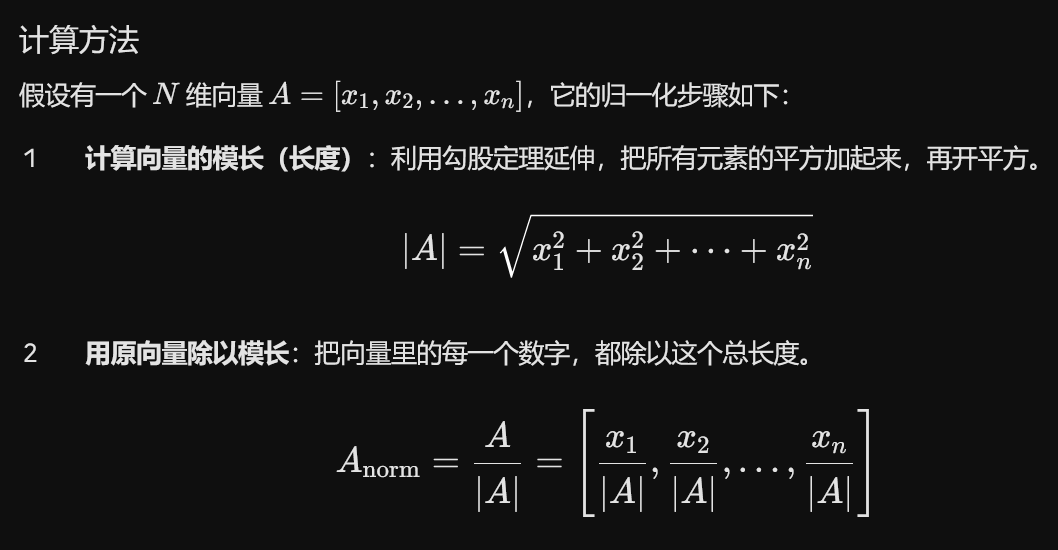
解释一下勾股定理延申:
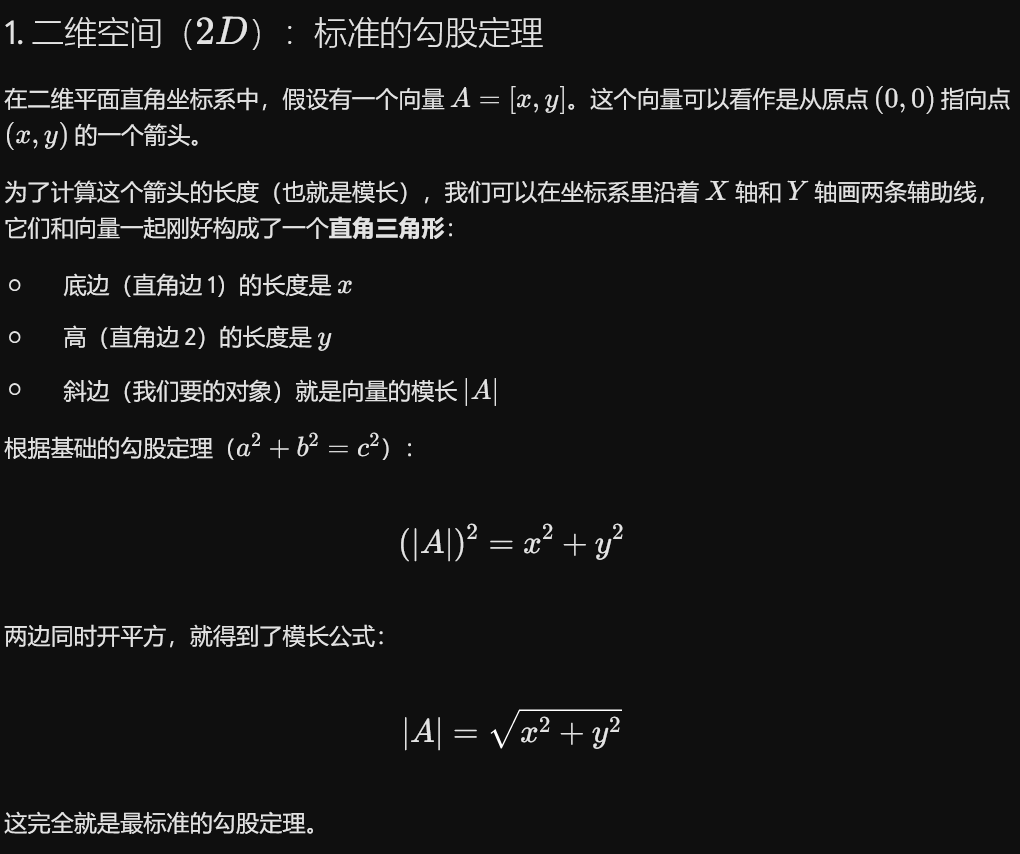
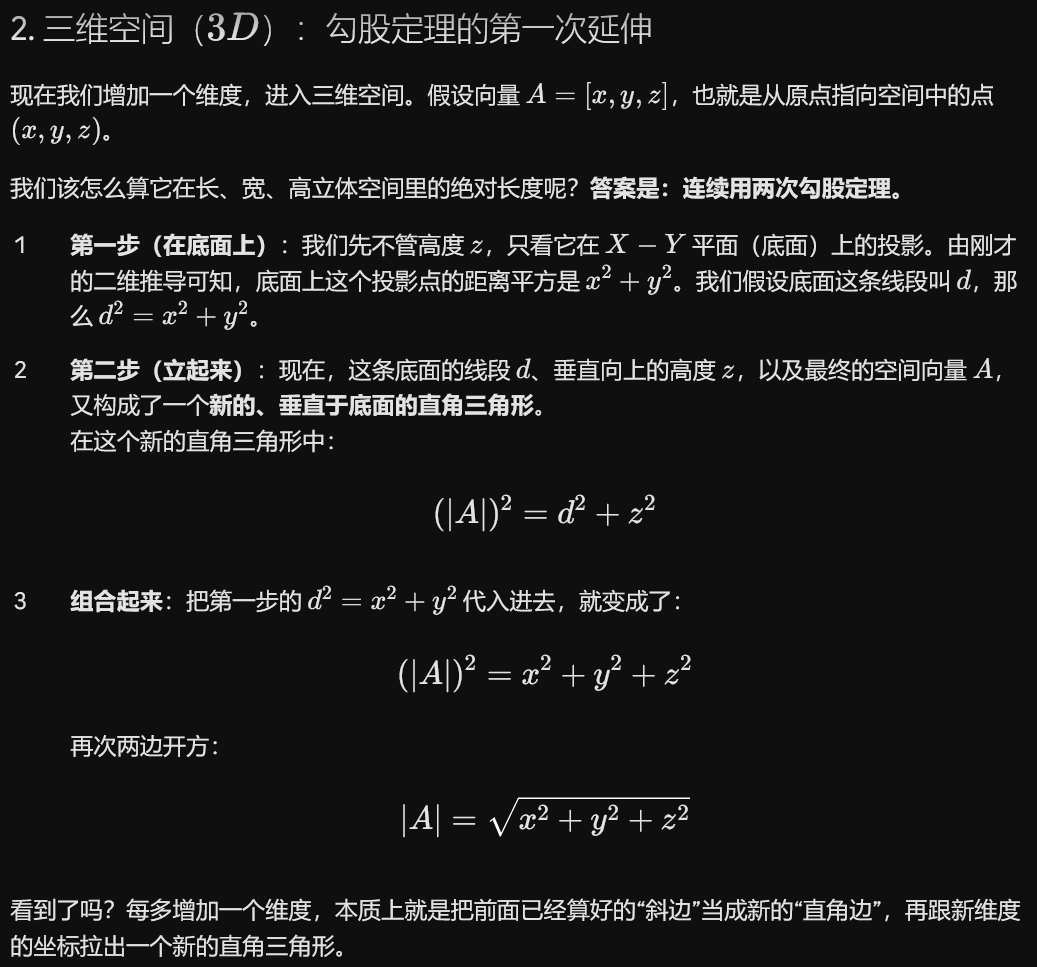
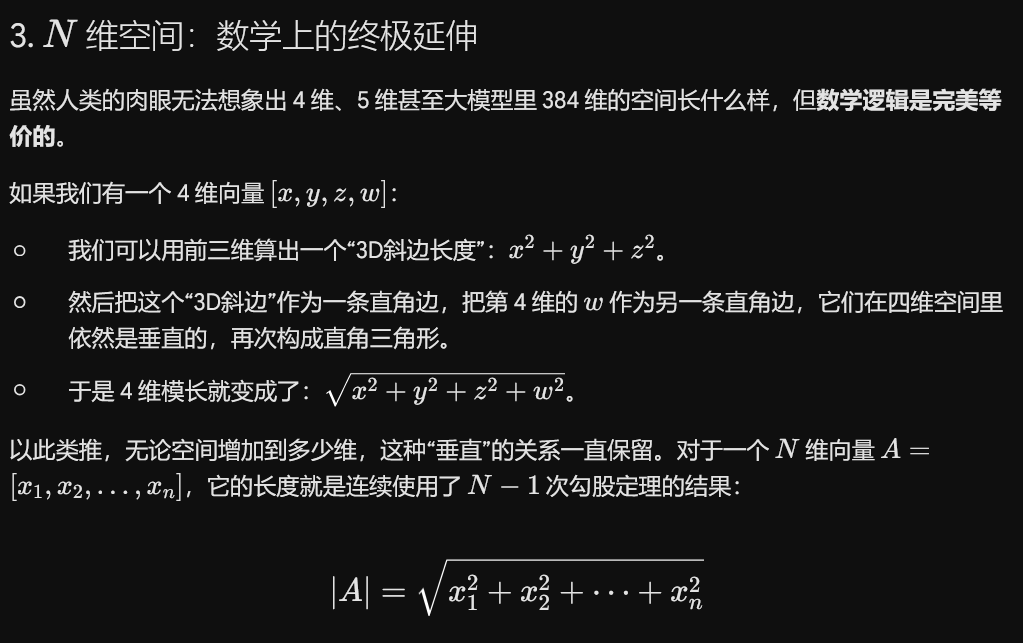
总结:为什么计算模长要先平方求和再开方?因为多维空间中的“距离”,本质上就是无数个跨维度的直角三角形斜边嵌套。 “平方和再开方”不是科学家凭空发明的规则,它就是勾股定理在多维空间里极其自然、完美的数学延伸。
为什么语义搜索一定要做这个?
做完 L2 归一化后,这个向量的几何长度就固定成了 1。在多维空间中,这意味着所有的句子向量都被投影到了一个半径为 1 的超球面上。 此时,向量的绝对大小(比如长文本带来的大数值)被消除了,模型只关心向量的方向。这就使得点积计算直接等价于余弦相似度,极大提升了搜索的准确性和计算速度。
点积(Dot Product)(又称数量积、内积)是最核心的数学工具之一。
简单来说,点积把两个向量(方向和大小的组合)组合起来,变成了一个标量(一个纯数字)。这个数字能够直观地反映出这两个向量有多“同心协力”。
下面从几何、代数以及它在语义搜索中的应用三个维度,为你拆解点积的本质。
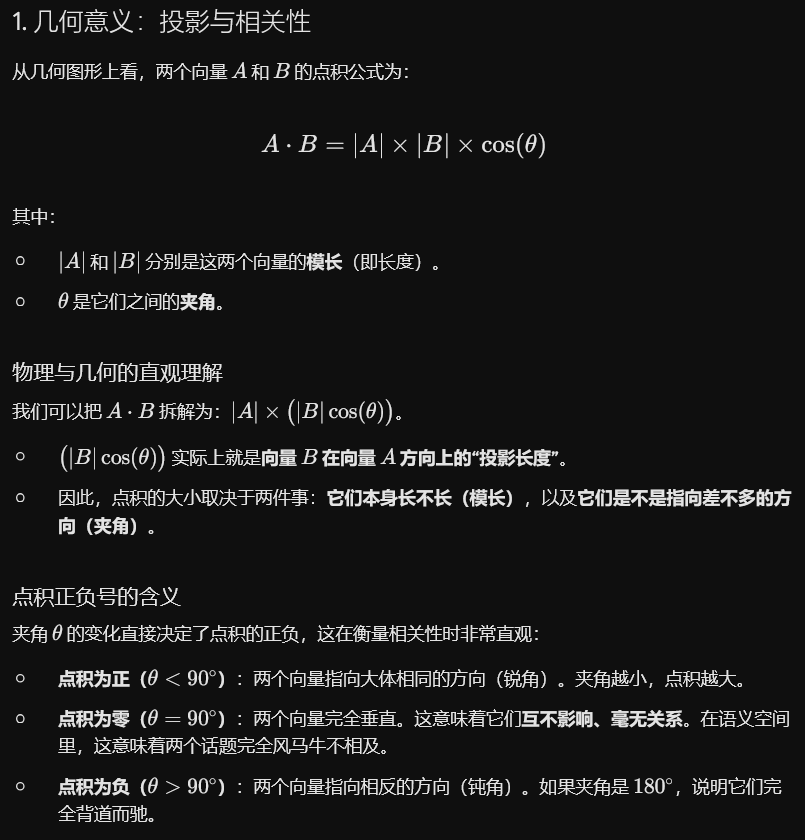
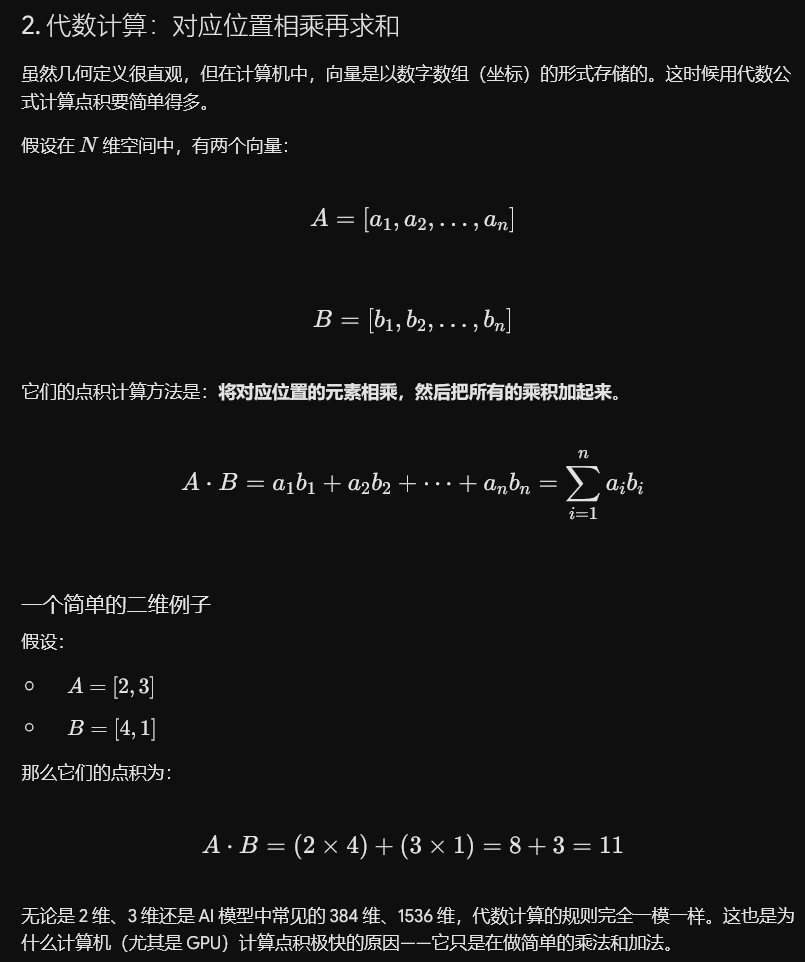
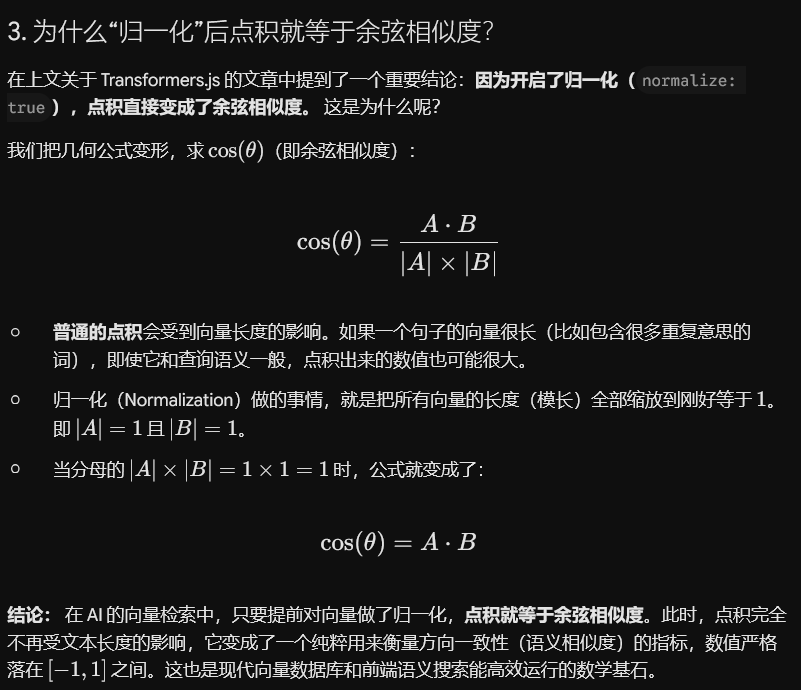
我们得出结论:在 AI 的向量检索中,只要提前对向量做了归一化,点积就等于余弦相似度。此时,点积完全不再受文本长度的影响,它变成了一个纯粹用来衡量方向一致性(语义相似度)的指标,数值严格落在 [−1,1] 之间。这也是现代向量数据库和前端语义搜索能高效运行的数学基石。
延展了这么多,那拉回去:
平均池化(Mean Pooling):把一句话中所有有效 Token 的向量逐维求平均,从而将多个 Token 向量合成为一个句子向量。
归一化(Normalization):把池化后的句子向量缩放为模长为 1 的单位向量,使点积可以直接表示余弦相似度。
在 Transformers.js 中,当你向管道调用传递 { pooling: 'mean', normalize: true } 时,这两个步骤都会自动完成。
特征提取管道(The Feature-Extraction Pipeline)
特征提取任务(Feature-extraction)返回的是模型在内部计算出的原始向量表示。以下是生成单个句子嵌入的核心 JavaScript 代码:
import { pipeline } from 'https://cdn.jsdelivr.net/npm/@huggingface/transformers@3.0.2';

// 加载特征提取管道
// Xenova/all-MiniLM-L6-v2 是该模型的浏览器兼容版本,权重相同
const extractor = await pipeline(
  'feature-extraction',
  'Xenova/all-MiniLM-L6-v2',
  { dtype: 'q8' } // 8位量化:下载量更小(~23 MB),精度高
);

// 提取单个句子的嵌入向量
const output = await extractor('I need help with my order', {
  pooling: 'mean',
  normalize: true
});

console.log(output);
// 输出 Tensor 对象:
// dims: [1, 384] 代表 1 个句子,384 个维度
// data: Float32Array(384) 包含实际的数字

// 转换为普通的 JavaScript 数组以便使用
const vector = output.tolist()[0];
console.log(`向量长度: ${vector.length}`); // 384
这段代码的作用:
pipeline()在第一次运行时会下载并初始化模型(随后浏览器会将其缓存,因此后续的页面加载都是瞬间完成的)。- 然后,你只需传入一个字符串和两个配置项来调用提取器(extractor),这会为你返回一个单一的、归一化的句子向量。
- 返回的结果是一个
Tensor(张量) 对象;调用.tolist()[0]可以将其转换为包含 384 个数字的普通 JavaScript 数组,供你在代码中直接使用。
理解输出的 Tensor(张量)
feature-extraction(特征提取)任务返回的 Tensor 对象有三个非常值得了解的字段:
dims是张量的形状[n_sentences, 384]。如果传入 1 个句子,dims[0]就是1;如果批量(batch)传入 10 个句子,dims[0]就是10。对于该模型,第二个维度始终是384。type值为'float32',这意味着 384 个数值中的每一个都是 32 位的浮点数。data是一个Float32Array(32位浮点数数组),它以行优先顺序(row-major order)包含了所有的数字。例如,对于包含 3 个句子的批量任务,这是一个包含 3×384=1,152 个数字的一维扁平数组。
.tolist() 会将张量转换为一个嵌套的 JavaScript 数组(每个句子对应一个内层数组)。output.tolist()[0] 则以普通数组的形式获取第一个句子的向量(包含 384 个数字)。
批处理:一次性嵌入多个句子
向提取器传入一个字符串数组,可以在单次模型调用中处理所有句子。这比在循环中逐个调用快得多,因为 Transformer 架构针对并行输入进行了优化。
const sentences = [
  'How do I track my shipment?',
  'What is your return policy?',
  'How can I reset my password?',
  'Do you offer international delivery?'
];

const batchOutput = await extractor(sentences, {
  pooling: 'mean',
  normalize: true
});

// batchOutput.dims = [4, 384] -- 4个句子,每个384维
const vectors = batchOutput.tolist();
console.log(`生成的向量数量: ${vectors.length}`); // 4
在构建包含数十个文档的知识库时,始终应该优先选择批处理。
余弦相似度:搜索背后的数学
一旦你获得了文档向量和查询向量,就需要衡量它们有多相似。由于我们在生成嵌入时使用了 normalize: true,两个向量的模长都已经为 1。此时,余弦相似度直接简化为两个向量的点积:
cosine_similarity(A,B)=A⋅B=∑(A[i]×B[i])
我们只需要将两个向量对应位置的数字相乘并求和即可。实际的得分范围大致如下:
- 0.90 到 1.00:含义几乎完全相同
- 0.70 到 0.90:强语义匹配
- 0.50 到 0.70:主题相关,角度不同
- 0.30 以下:基本不相关
仔细解释一下:
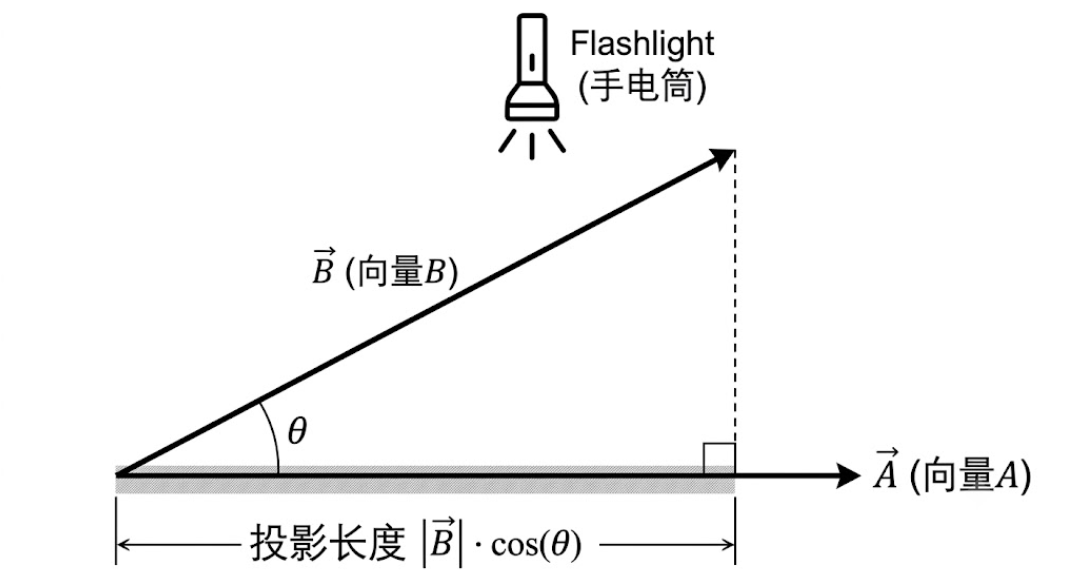
1. 想象一个生活场景:手电筒与影子
假设地上放着一根巨大的箭竹,我们叫它 向量 A。 旁边斜着立了一根晾衣杆,我们叫它 向量 B。它们两个的底部是连在一起的。
现在,你拿一把手电筒,站在垂直于 A的正上方(也就是垂直于地面)往下照。
这时候,晾衣杆(向量 B)就会在地面(向量 A)上投下一个影子。
- 这个“影子的实际长度”,在数学上就叫做“向量 B 在向量 A 方向上的投影长度”。
2. 怎么用数学算出这个影子的长度?
现在我们把这个“手电筒照影子”的画面连成一个几何图形:
斜着的晾衣杆是 向量 B(它的长度是 ∣A∣ 还是 ∣B∣呢?当然是∣B∣)。

垂直照下来的光线,和地面是一条垂直线。

地面上的影子,是直角三角形的底边。
这刚好构成了一个标准的直角三角形:
斜边:晾衣杆,长度是 ∣B∣。

夹角:晾衣杆和地面的夹角,就是 θ。

底边(影子):就是我们要算的长。
根据我们在初中/高中学过的三角函数定义:
cos(θ) = 底边 / 斜边
我们把两边同时乘以“斜边”,公式就变成了:
底边=斜边×cos(θ)
把我们的主角代入进去:
- 底边就是影子长度。
- 斜边就是∣B∣,向量的长度
所以: 影子的长度=∣B∣×cos(θ)
这就是为什么说 (∣B∣cos(θ)) 实际上就是向量 B 在向量 A 方向上的“投影长度”。它不是凭空编出来的,它就是用夹角和斜边算出来的直角三角形底边长。
3. 再回头看点积公式
现在我们把这个影子带回点积的几何公式: A⋅B = ∣A∣×∣B∣× cos(θ)
我们给它加个括号,分组看一下: A⋅B = ∣A∣ × ( ∣B∣ x cos(θ) )
用大白话翻译这个公式就是: 两个向量的点积=(向量 A 的长度)×(向量 B 射在 A 上的影子长度) 为什么这个乘积能代表“相关性”?
如果向量 B 和向量 A 的方向非常接近(夹角很小),那么晾衣杆倒得比较平,地面的影子就很长,影子长,两个长度相乘的点积就很大。

如果向量 B 和向量 A 互相垂直(夹角 90∘),手电筒从正上方照下来,晾衣杆变成了一条垂直的线,它在地面上的影子就缩成了一个点(长度为 0)。影子是 0,无论 A 有多长,相乘之后的点积就是 0。
这就是为什么点积可以用来算相似度。方向越接近,投影(影子)就越长,点积就越大!
相似度计算函数:
function cosineSimilarity(vecA, vecB) {
  let dotProduct = 0;
  for (let i = 0; i < vecA.length; i++) {
    dotProduct += vecA[i] * vecB[i];
  }
  return dotProduct;
}
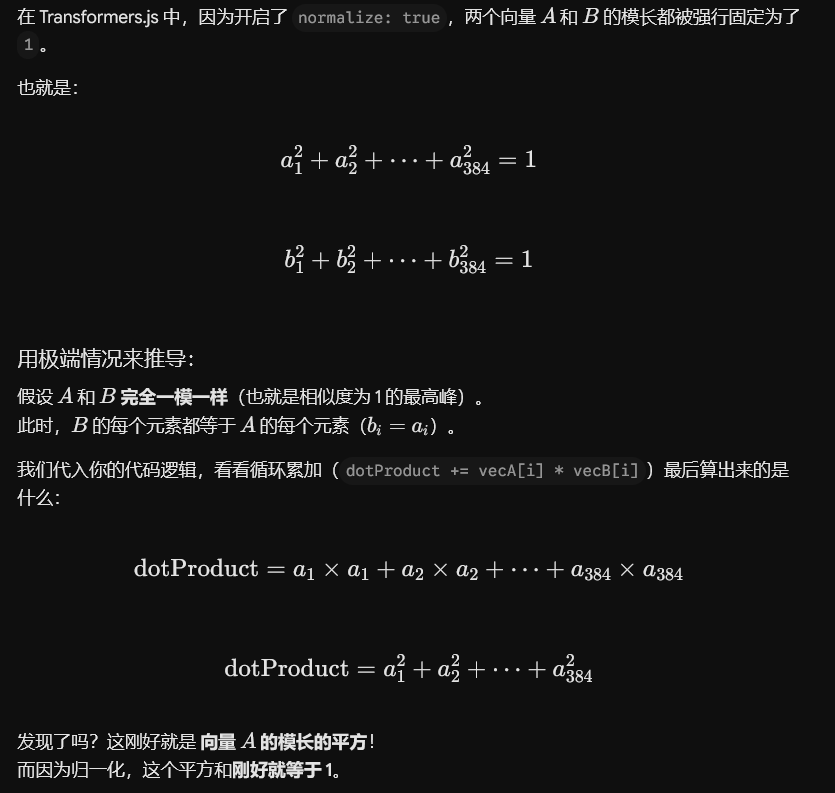
为什么加起来最大也就是1,不会突破1呢?
构建一个语义搜索类(Semantic Search Class)
在实际应用中,我们可以将上述逻辑封装进一个可重用的 JavaScript 类中。该类负责管理文档库、生成向量以及计算搜索结果:
/**
 * SemanticSearch -- a simple client-side semantic search engine.
 *
 * Usage:
 *   const search = new SemanticSearch(extractor);
 *   await search.indexDocuments(myDocs);
 *   const results = await search.search('my query', 5);
 */
class SemanticSearch {
  constructor(extractor) {
    // The feature-extraction pipeline instance (already loaded)
    this.extractor = extractor;

    // Stores documents after indexing: { id, text, metadata, vector }
    this.index = [];
  }

  /**
   * Embed all documents and store their vectors in memory.
   * Call this once at startup. Searches reuse these cached vectors.
   *
   * @param {Array} docs
   */
  async indexDocuments(docs) {
    console.time('indexing');

    // Pull just the text strings for batch embedding
    const texts = docs.map(doc => doc.text);

    // Single batch call embeds all documents at once -- much faster than looping
    const output = await this.extractor(texts, {
      pooling: 'mean',
      normalize: true
    });

    // Convert the tensor to an array of 384-element arrays, one per document
    const vectors = output.tolist();

    // Attach each vector to its original document object
    // The spread (...doc) preserves all original fields: title, URL, tags, etc.
    this.index = docs.map((doc, i) => ({
      ...doc,
      vector: vectors[i]
    }));

    console.timeEnd('indexing');
    console.log(`Indexed ${this.index.length} documents`);
    return this;
  }

  /**
   * Search indexed documents for the most semantically relevant results.
   *
   * @param {string} query - The search query in plain language
   * @param {number} topK  - How many results to return (default: 5)
   * @returns {Promise<Array>} Results sorted by relevance, highest first
   */
  async search(query, topK = 5) {
    if (this.index.length === 0) {
      throw new Error('No documents indexed. Call indexDocuments() first.');
    }

    console.time('query embedding');

    // Embed the search query -- the only model inference call during a search
    const queryOutput = await this.extractor(query, {
      pooling: 'mean',
      normalize: true
    });
    const queryVector = queryOutput.tolist()[0];

    console.timeEnd('query embedding');
    console.time('scoring');

    // Score every indexed document against the query vector
    // This is pure JavaScript math -- no model involved, so it's instant
    const scored = this.index.map(doc => ({
      doc,
      score: cosineSimilarity(queryVector, doc.vector)
    }));

    // Sort descending -- highest relevance score first
    scored.sort((a, b) => b.score - a.score);

    console.timeEnd('scoring');

    // Return the top-k results, stripping the vector from the output
    return scored.slice(0, topK).map(({ doc, score }) => ({
      id:       doc.id,
      title:    doc.title,
      text:     doc.text,
      metadata: doc.metadata,
      score:    score
    }));
  }

  /**
   * Serialize the index to JSON for storage in localStorage or IndexedDB.
   * Saves the embedding step on subsequent page loads.
   */
  toJSON() {
    return JSON.stringify(this.index);
  }

  /**
   * Restore a previously serialized index without re-embedding anything.
   * Vectors are plain arrays in JSON and deserialize directly.
   */
  fromJSON(json) {
    this.index = JSON.parse(json);
    return this;
  }
}
这段代码的作用:
indexDocuments接收你传入的文档对象数组(每个对象至少需要包含一个text字段),并在单次批量调用中对所有文本进行嵌入处理(Embedding),然后将结果存储在this.index中。- 扩展运算符(
...doc) 会完整保留你传入的所有元数据(Metadata),确保没有任何信息会丢失。 search仅对查询语句(Query)进行嵌入处理(单次模型推理调用,通常在 100 毫秒以内),然后在一个普通的 JavaScript 循环中,对每一个缓存的文档向量运行cosineSimilarity(余弦相似度) 计算。- 在评分(Scoring)阶段不需要再次进行模型推理,这就是为什么在索引建立完成后,搜索体验会让人感觉是瞬间响应的原因。
toJSON和fromJSON方法 允许你在页面加载之间持久化保存索引。当用户再次访问时,可以完全跳过文本嵌入步骤。
全代码:
<!DOCTYPE html>
<html lang="en">
<head>
  <meta charset="UTF-8" />
  <meta name="viewport" content="width=device-width, initial-scale=1.0" />
  <title>Semantic Knowledge Base Search</title>
  <style>
    * { box-sizing: border-box; margin: 0; padding: 0; }
    body {
      font-family: system-ui, sans-serif;
      max-width: 760px;
      margin: 2rem auto;
      padding: 0 1rem;
      background: #f8fafc;
      color: #1e293b;
    }
    h1 { font-size: 1.5rem; margin-bottom: 0.25rem; }
    .subtitle { color: #64748b; font-size: 0.9rem; margin-bottom: 1.5rem; }

    .search-bar {
      display: flex;
      gap: 0.5rem;
      margin-bottom: 0.75rem;
    }
    input[type="text"] {
      flex: 1;
      padding: 0.6rem 0.8rem;
      font-size: 1rem;
      border: 1px solid #cbd5e1;
      border-radius: 6px;
    }
    button {
      padding: 0.6rem 1.4rem;
      font-size: 1rem;
      background: #2563eb;
      color: white;
      border: none;
      border-radius: 6px;
      cursor: pointer;
    }
    button:disabled { background: #93c5fd; cursor: not-allowed; }

    #status {
      font-size: 0.85rem;
      color: #64748b;
      margin-bottom: 1rem;
      min-height: 1.2em;
    }
    .examples {
      font-size: 0.85rem;
      color: #64748b;
      margin-bottom: 1.5rem;
    }
    .example-query {
      display: inline-block;
      background: #e0f2fe;
      color: #0369a1;
      border-radius: 4px;
      padding: 0.2rem 0.5rem;
      margin: 0.2rem;
      cursor: pointer;
      font-size: 0.82rem;
    }
    .example-query:hover { background: #bae6fd; }

    .result-card {
      background: white;
      border: 1px solid #e2e8f0;
      border-radius: 8px;
      padding: 1rem;
      margin-bottom: 0.75rem;
    }
    .result-header {
      display: flex;
      justify-content: space-between;
      align-items: flex-start;
      margin-bottom: 0.4rem;
    }
    .result-title { font-weight: 600; font-size: 1rem; }
    .score-badge {
      font-size: 0.78rem;
      font-weight: 700;
      padding: 0.15rem 0.5rem;
      border-radius: 12px;
      white-space: nowrap;
    }
    .score-high   { background: #dcfce7; color: #15803d; }
    .score-medium { background: #fef9c3; color: #854d0e; }
    .score-low    { background: #f1f5f9; color: #64748b; }
    .result-category { font-size: 0.78rem; color: #64748b; margin-bottom: 0.4rem; }
    .result-text { font-size: 0.9rem; color: #475569; line-height: 1.5; }
    #no-results { text-align: center; color: #94a3b8; padding: 2rem; }
  </style>
</head>
<body>
  <h1>Knowledge Base Search</h1>
  <p class="subtitle">
    Finds relevant articles even when your words don't appear in the text.
    Runs entirely in your browser.
  </p>

  <div class="search-bar">
    <input type="text" id="query-input" placeholder="Ask anything..." disabled />
    <button id="search-btn" disabled>Search</button>
  </div>

  <div id="status">Loading model -- first run downloads ~23 MB...</div>

  <div class="examples">
    Try these (no keyword overlap with matching articles):
    <span class="example-query">cheap shipping option</span>
    <span class="example-query">I can't get into my account</span>
    <span class="example-query">item arrived damaged</span>
    <span class="example-query">stop receiving emails</span>
    <span class="example-query">buy now pay later</span>
  </div>

  <div id="results"></div>

  <script type="module">
    import { pipeline }
      from 'https://cdn.jsdelivr.net/npm/@huggingface/transformers@3.0.2';

    // ----------------------------------------------------------------
    // Knowledge base corpus
    // Each document has an id, title, category, and text to embed.
    // In a real application, load this from an API or a JSON file.
    // ----------------------------------------------------------------
    const KNOWLEDGE_BASE = [
      {
        id: 'kb-001',
        title: 'Standard Shipping Information',
        category: 'Shipping',
        text: 'Standard shipping takes 5-7 business days. Orders over $50 qualify for free standard shipping. We ship to all 50 US states and most US territories.'
      },
      {
        id: 'kb-002',
        title: 'Economy Delivery Options',
        category: 'Shipping',
        text: 'Our budget-friendly delivery option delivers in 7-10 business days at a reduced rate of $2.99 for small packages. This is our most affordable way to receive your order.'
      },
      {
        id: 'kb-003',
        title: 'Express and Overnight Shipping',
        category: 'Shipping',
        text: 'Expedited delivery guarantees arrival within 2 business days. Overnight delivery is available for orders placed before 2pm EST. Premium shipping rates apply.'
      },
      {
        id: 'kb-004',
        title: 'Return Policy Overview',
        category: 'Returns',
        text: 'You can send back most items within 30 days of purchase for a full refund. Items must be in original packaging. Electronics have a 15-day return window.'
      },
      {
        id: 'kb-005',
        title: 'Damaged Item Policy',
        category: 'Returns',
        text: 'If your package arrived broken or defective, please contact us within 7 days. We will send a prepaid label and ship a replacement at no additional cost. Take photos before returning.'
      },
      {
        id: 'kb-006',
        title: 'How Refunds Are Processed',
        category: 'Returns',
        text: 'After we receive your returned merchandise, refunds are issued to your original payment method within 3-5 business days. You will receive an email confirmation when processing is complete.'
      },
      {
        id: 'kb-007',
        title: 'Account Access and Password Reset',
        category: 'Account',
        text: 'If you cannot sign in or forgot your credentials, click Forgot Password on the login page. We will email you a reset link valid for 24 hours. Check your spam folder if you do not see it.'
      },
      {
        id: 'kb-008',
        title: 'Email Preferences and Unsubscribing',
        category: 'Account',
        text: 'To stop receiving promotional messages, click the unsubscribe link at the bottom of any marketing email. You can also manage notification preferences in your account settings under Communication.'
      },
      {
        id: 'kb-009',
        title: 'Updating Payment Methods',
        category: 'Billing',
        text: 'Add, remove, or change your credit card and billing details in the Wallet section of your account. We accept Visa, Mastercard, American Express, and PayPal.'
      },
      {
        id: 'kb-010',
        title: 'Buy Now Pay Later Options',
        category: 'Billing',
        text: 'We offer installment payment plans through Klarna and Afterpay, letting you split your purchase into four interest-free payments. Select your preferred pay-later service at checkout.'
      },
      {
        id: 'kb-011',
        title: 'Order Tracking and Status',
        category: 'Orders',
        text: 'Track your shipment using the link in your dispatch confirmation email or by entering your order number on our tracking page. Updates occur every 12-24 hours once your parcel is in transit.'
      },
      {
        id: 'kb-012',
        title: 'Cancelling an Order',
        category: 'Orders',
        text: 'Orders can be cancelled within 1 hour of placement before they enter our fulfillment process. After that window, you will need to wait for delivery and then initiate a return.'
      }
    ];

    // ----------------------------------------------------------------
    // Cosine similarity -- dot product shortcut works because
    // normalize: true gives us unit-length vectors
    // ----------------------------------------------------------------
    function cosineSimilarity(vecA, vecB) {
      let dot = 0;
      for (let i = 0; i < vecA.length; i++) {
        dot += vecA[i] * vecB[i];
      }
      return Math.max(-1, Math.min(1, dot));
    }

    // ----------------------------------------------------------------
    // SemanticSearch class -- embed documents once, search many times
    // ----------------------------------------------------------------
    class SemanticSearch {
      constructor(extractor) {
        this.extractor = extractor;
        this.index = [];
      }

      async indexDocuments(docs) {
        const texts = docs.map(d => d.text);

        // One batch call embeds all documents simultaneously
        const output = await this.extractor(texts, {
          pooling: 'mean',
          normalize: true
        });
        const vectors = output.tolist();

        // Store each document with its pre-computed embedding attached
        this.index = docs.map((doc, i) => ({ ...doc, vector: vectors[i] }));
        return this;
      }

      async search(query, topK = 5) {
        // Embed only the query -- documents are already cached in this.index
        const qOutput = await this.extractor(query, {
          pooling: 'mean',
          normalize: true
        });
        const qVec = qOutput.tolist()[0];

        // Score all documents (pure JS arithmetic, no model involved)
        const scored = this.index
          .map(doc => ({ doc, score: cosineSimilarity(qVec, doc.vector) }))
          .sort((a, b) => b.score - a.score);

        return scored.slice(0, topK);
      }
    }

    // ----------------------------------------------------------------
    // UI helpers
    // ----------------------------------------------------------------
    const statusEl  = document.getElementById('status');
    const queryEl   = document.getElementById('query-input');
    const searchBtn = document.getElementById('search-btn');
    const resultsEl = document.getElementById('results');

    function scoreClass(score) {
      if (score >= 0.55) return 'score-high';
      if (score >= 0.35) return 'score-medium';
      return 'score-low';
    }

    function renderResults(results) {
      if (results.length === 0) {
        resultsEl.innerHTML = '<div id="no-results">No results found.</div>';
        return;
      }
      resultsEl.innerHTML = results.map(({ doc, score }) => {
        const pct = (score * 100).toFixed(1);
        const cls = scoreClass(score);
        return `
          <div class="result-card">
            <div class="result-header">
              <span class="result-title">${doc.title}</span>
              <span class="score-badge ${cls}">${pct}% match</span>
            </div>
            <div class="result-category">${doc.category}</div>
            <div class="result-text">${doc.text}</div>
          </div>`;
      }).join('');
    }

    // ----------------------------------------------------------------
    // Boot sequence: load model, index documents, enable UI
    // ----------------------------------------------------------------
    let searcher;

    async function init() {
      try {
        // Load the feature-extraction pipeline
        // dtype: 'q8' = 8-bit quantized -- smaller download, nearly identical accuracy
        const extractor = await pipeline(
          'feature-extraction',
          'Xenova/all-MiniLM-L6-v2',
          {
            dtype: 'q8',
            progress_callback: (p) => {
              if (p.status === 'progress') {
                const pct = Math.round(p.progress ?? 0);
                statusEl.textContent = `Downloading model: ${pct}%`;
              }
            }
          }
        );

        statusEl.textContent = 'Indexing knowledge base...';

        // Embed all 12 documents -- cached in memory for the session
        searcher = new SemanticSearch(extractor);
        await searcher.indexDocuments(KNOWLEDGE_BASE);

        statusEl.textContent =
          `Ready -- ${KNOWLEDGE_BASE.length} articles indexed. ` +
          `Model cached for instant reload.`;
        queryEl.disabled  = false;
        searchBtn.disabled = false;
        queryEl.focus();

      } catch (err) {
        statusEl.textContent = `Error: ${err.message}`;
        console.error(err);
      }
    }

    // ----------------------------------------------------------------
    // Search handler
    // ----------------------------------------------------------------
    async function handleSearch() {
      const query = queryEl.value.trim();
      if (!query || !searcher) return;

      searchBtn.disabled = true;
      searchBtn.textContent = 'Searching...';
      resultsEl.innerHTML = '';

      try {
        // Returns top 5 results ranked by cosine similarity score
        const results = await searcher.search(query, 5);
        renderResults(results);
      } catch (err) {
        resultsEl.innerHTML =
          `<div style="color:#dc2626">Search error: ${err.message}</div>`;
      }

      searchBtn.disabled = false;
      searchBtn.textContent = 'Search';
    }

    // Clicking an example chip populates and runs the search
    document.querySelectorAll('.example-query').forEach(chip => {
      chip.addEventListener('click', () => {
        queryEl.value = chip.textContent;
        handleSearch();
      });
    });

    searchBtn.addEventListener('click', handleSearch);
    queryEl.addEventListener('keydown', e => {
      if (e.key === 'Enter' && !searchBtn.disabled) handleSearch();
    });

    // Start loading as soon as the page opens
    init();
  </script>
</body>
</html>
这段代码的作用:
- 当页面加载时,
init()函数会立即运行。它会创建特征提取管道(Feature-extraction Pipeline),并通过一个进度回调函数(Progress Callback)在模型下载期间实时更新状态行。 - 一旦模型准备就绪,
indexDocuments会在单次批量调用中对全部 12 篇文章进行嵌入处理(Embedding),并将这些向量存储在内存中。在此步骤完成之前,搜索输入框和搜索按钮都处于禁用(Disabled)状态,从而防止用户在索引建立中途触发搜索。 - 当用户进行搜索时,
search()函数仅对查询语句进行嵌入(单次模型推理调用,通常在 100 毫秒以内),然后遍历所有 12 个缓存的文档向量,计算每一个向量的余弦相似度。 - 该评分循环属于纯 JavaScript 算术运算,不涉及任何模型调用,因此在不到 1 毫秒的时间内即可完成。
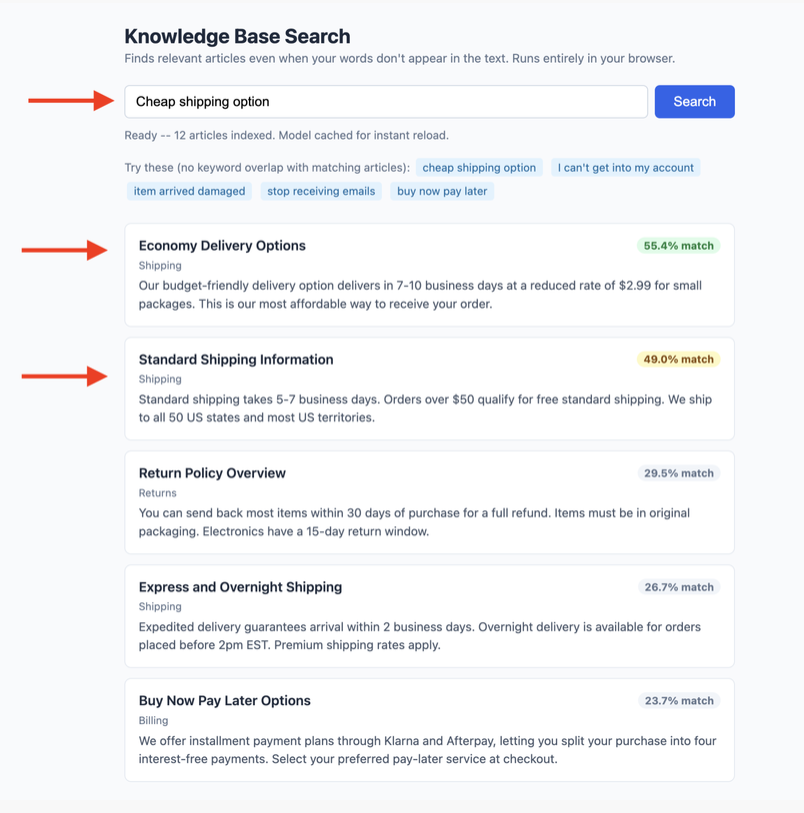
- 最终的搜索结果会按照分数从高到低进行渲染,并配有颜色编码的匹配百分比徽章(Badges)。
在 Web Worker 中运行推理
上面的示例(Demo)是在浏览器的主线程(Main Thread)中运行所有模型推理的。对于内部工具和演示 Demo 来说这没什么问题,但在面向用户的**生产级应用(Production App)*中,这种做法是绝对不行的:因为加载模型和生成嵌入(Embedding)会*阻塞主线程,这意味着在模型运行推理时,页面的滚动、输入和动画都会卡死。在配置较低的硬件设备上,浏览器甚至可能会弹出“页面无响应”的警告。
Web Worker 很好地解决了这个问题。它允许 JavaScript 在一个后台线程中运行,这样一来,主线程可以继续保持流畅的交互和响应,而 Worker 则在后台处理所有繁的模型相关工作。
以下是 Worker 文件的内容(embedder-worker.js):
// embedder-worker.js
// Runs in a background thread -- has no access to the DOM.

import { pipeline } from
  'https://cdn.jsdelivr.net/npm/@huggingface/transformers@3.0.2';

// Singleton pattern: load the pipeline once and reuse it.
// Prevents re-downloading the model if multiple messages arrive quickly.
let extractor = null;

async function getExtractor() {
  if (!extractor) {
    extractor = await pipeline(
      'feature-extraction',
      'Xenova/all-MiniLM-L6-v2',
      {
        dtype: 'q8',
        progress_callback: (p) => {
          // Forward progress updates back to the main thread for UI display
          self.postMessage({ type: 'progress', payload: p });
        }
      }
    );
  }
  return extractor;
}

// Listen for embedding requests from the main thread
self.addEventListener('message', async (event) => {
  const { type, id, payload } = event.data;

  try {
    const ext = await getExtractor();

    if (type === 'embed') {
      // payload.texts can be a single string or an array of strings
      const output = await ext(payload.texts, {
        pooling: 'mean',
        normalize: true
      });

      // Convert tensor to plain array before sending back
      // (Tensor objects are not transferable across threads)
      self.postMessage({
        type: 'embed_result',
        id,       // Echo the request ID so the main thread can match this response
        payload: output.tolist()
      });
    }
  } catch (err) {
    self.postMessage({ type: 'error', id, payload: err.message });
  }
});
主线程main.js的内容:
// Create the Worker -- it starts loading the model immediately in the background
const worker = new Worker('./embedder-worker.js', { type: 'module' });

// Track in-flight requests so we can resolve them when results come back
const pending = new Map();
let requestId = 0;

// Send an embedding request to the Worker and return a Promise
function embedText(texts) {
  return new Promise((resolve, reject) => {
    const id = requestId++;

    // Store resolve/reject so we can call them when the Worker responds
    pending.set(id, { resolve, reject });

    // Send the request to the background thread
    worker.postMessage({ type: 'embed', id, payload: { texts } });
  });
}

// Handle messages coming back from the Worker
worker.addEventListener('message', (event) => {
  const { type, id, payload } = event.data;

  if (type === 'progress') {
    // Update your loading UI here
    if (payload.status === 'progress') {
      console.log(`Model loading: ${Math.round(payload.progress)}%`);
    }
    return;
  }

  // Find the pending Promise that matches this response by ID
  const p = pending.get(id);
  if (!p) return;
  pending.delete(id);

  if (type === 'embed_result') {
    p.resolve(payload);  // payload is an array of 384-element vectors
  } else if (type === 'error') {
    p.reject(new Error(payload));
  }
});

// Usage -- works the same as the non-Worker version but stays off the main thread
const vectors = await embedText(['How do I return a product?']);
console.log(`Embedding dimensions: ${vectors[0].length}`);  // 384
上面2段代码的作用:
- 该 Worker 采用了单例模式(Singleton Pattern):
getExtractor()函数在第一次运行时会创建提取管道,并在后续的调用中直接返回该实例。这样可以避免在多个消息接踵而至时重复下载模型。 - 每个消息中的
id字段是一个关联键(Correlation Key):当 Worker 返回embed_result(嵌入结果)时,主线程会利用这个id在pending(挂起)的 Map 映射表中找到匹配的 Promise 并将其状态变为已完成(Resolve)。如果没有这个机制,当有两个嵌入请求同时在运行时,你将无法分辨哪个结果属于哪个请求。 pendingMap 映射表保持着极小的体积:它在同一时间只为每个正在运行的请求保留一个条目,并在收到对应的响应后自动进行清理。
在页面加载之间持久化保存索引
在整个流程中,计算嵌入(Embeddings)是最耗时的步骤。如果你的文档库在用户多次访问之间不会发生改变,你可以将整个向量索引序列化为 JSON 字符串,并将其存储在浏览器的 localStorage 中。这样一来,用户下一次打开页面时,就可以完全跳过嵌入计算这一步骤。
// After indexing -- save to localStorage
const serialized = JSON.stringify(searcher.index);
localStorage.setItem('kb-index', serialized);
localStorage.setItem('kb-index-version', '2025-06-01'); // Update this when content changes

// On page load -- restore the index if it exists and is still current
const storedVersion = localStorage.getItem('kb-index-version');
const currentVersion = '2025-06-01';

if (storedVersion === currentVersion) {
  const stored = localStorage.getItem('kb-index');
  if (stored) {
    searcher.index = JSON.parse(stored);
    // Vectors are plain arrays in JSON -- no special deserialization needed
    console.log('Index restored from cache, skipping embedding step');
  }
}
localStorage 可以处理大约 5 MB 的数据量(具体取决于浏览器)。对于包含 12 篇文档、每篇文档带有 384 维浮点数向量的情况,序列化后的索引大约只有 200 KB,完全在这一限制范围之内。
而关于更大规模的数据集,IndexedDB 则没有实际上的容量限制。它的工作原理与 localStorage 完全相同,只是其 API(代码调用接口)会稍微繁琐、复杂一些。
选择合适的模型
对于大多数英文应用场景来说,Xenova/all-MiniLM-L6-v2 是最完美的默认选择。它速度快、体积小,并且在语义搜索任务中表现出非常强劲的效果。下表列出了常用的几个核心模型选项:
| Model | Dimensions | Download size (q8) | Best for |
|---|---|---|---|
| Xenova/all-MiniLM-L6-v2 | 384 | ~23 MB | General English search, fast |
| Xenova/all-mpnet-base-v2 | 768 | ~86 MB | Higher accuracy, larger download |
| Xenova/multilingual-e5-small | 384 | ~34 MB | 100+ languages |
对于一个同时包含法语、德语和英语内容的知识库这类多语言应用场景来说,multilingual-e5-small 模型能够非常完美地处理跨语言查询。即使用户使用的是英语进行搜索,系统也能精准地找出用法语撰写的相关文档。这是因为该模型能够将相同或相近的含义映射到向量空间的临近区域,而完全不受其具体语言种类的限制。
生产环境优化建议
为了让这个前端搜索引擎达到工业级可用,几个关键的优化技术:
- 使用 Web Worker 避免线程阻塞:模型推理(Inference)属于密集型计算。如果直接在主线程运行,会导致 UI 卡死。建议将
pipeline的加载和执行放入 Web Worker 中,通过postMessage与主线程通信。 - 持久化索引(localStorage / IndexedDB):文档的向量在内容不变的情况下是固定的。不需要每次页面加载都重新对整个知识库计算嵌入。你可以使用
JSON.stringify()将计算好的向量数组保存到localStorage(数据量小)或IndexedDB(数据量大)中,下次直接加载即可。
总结
利用 Transformers.js,纯前端不仅能做简单的文本匹配,更能将复杂的 NLP 模型(如 Sentence-Transformers)直接搬到用户的浏览器里。这不仅消除了高昂的服务器和 API 成本,还提供了绝佳的隐私保护(数据不出本地)。